See Record360 at Bauma 2025: April 7-13, Munich, Booth C4-719

record_360

Truck Inspection Checklists and Apps for Compliance and Efficiency

Truck Inspection Checklist

Truck inspections can provide a wealth of relevant information for the driver and the organization responsible for shipping whatever freight might be present aboard the truck. In some cases, like for truckers and other vehicle operators with a commercial driver’s license (CDL), regulatory compliance requires a pre-trip inspection checklist to ensure both the driver’s safety and the security of the goods. It can be vitally important to ensure that the vehicle is functioning properly to avoid injury to the driver or other motorists and to preserve the integrity of the shipped goods.

A truck inspection checklist covers almost everything a driver needs to inspect before embarking on a lengthy journey. From the front of the truck and the engine compartment to the rear of the trailer – numerous items need to be inspected to ensure proper functionality. A daily truck inspection checklist PDF might have all the necessary items, but memorizing checklist items and making the checklist inspections an integral part of shipping routine preparations can be quite taxing.

Essential Elements of a Pre-Trip Inspection for Truck Drivers

At the front end of the truck, the driver must inspect the integrity of the engine compartment as well as the necessary fluids (oil, coolant, power steering, etc.), hose, and pump connections, and drivers must also ensure that belts are properly mounted and do not have any signs of extreme wear like cracks or frayed edges. Drivers must also inspect the front suspension, including the spring mounts/hangers, shock absorbers, and airbag(s) – there shouldn’t be any leaks, abrasions, or other visible signs of damage or wear.

Additionally, drivers are responsible for ensuring that mirrors and brackets are all secured and visible from the driver’s seat. The steps, door, and hinges must all be sturdily mounted and secure enough to seal properly. Similarly, the fuel tank should remain intact with the cap and seal still attached and functional.

Towards the rear of the vehicle and trailer, drivers must inspect the frame, drive shaft, exhaust, mudflaps, and catwalks. At the coupling area, drivers must ensure that the air connector is secure and that cables are not dragging or tangled. Mounting bolts are all present and tight, the skid plate must be sufficiently greased, and the locking jaw and kingpin must be mounted and secure. Additionally, drivers must inspect the brakes, wheels, tires, and wheel rims to reduce the possibility of a flat or blowout.

There are also inspection points for the trailer and inside the cab, so the inspector assesses a lot of information during a pre-trip inspection. But instead of attempting to memorize a truck inspection report, drivers can utilize a truck inspection checklist app to help ensure that everything is as it should be.

Drivers could also search for a post-trip inspection checklist PDF to double-check items once the trip has been completed to determine any damages or wear that might have occurred in transit. CDL manuals and company documents may also provide additional information about the thoroughness of inspections.
DOT Truck Inspection Checklist

Like a CDL checklist, a Department of Transportation (DOT) truck inspection checklist can help ensure that compliance regulations are satisfied and that the vehicle and its operator can legally operate on public roads. All commercial vehicles weighing over 10,001 pounds must undergo an annual DOT inspection to assess the parts and extent of vehicle wear. There are six different ‘levels’ of DOT inspections – levels 1 through 6 – each serving a unique purpose.

Level 1

The most commonly conducted of these inspections is level 1. Generally, inspectors assess various documents, the health, and well-being of the vehicle operator, in addition to the safety and functionality of the vehicle. These inspections are conducted in person and generally take under an hour to complete.

Level 2

Level 2 inspections are quite similar to level 1 inspections, with the primary difference being that a level 2 inspection does not require the inspector to climb under the vehicle. Because of this, level 2 inspections are generally completed in about 30 minutes.

Level 3

A level 3 inspection involves the assessor checking the driver for all the necessary certifications and proper licenses. Drivers must provide a skill performance evaluation certificate, relevant medical certifications, a valid driver’s license, a record of duty status, and any relevant driver or vehicle inspection reports. Because level 3 inspections are driver-centric, they typically only take about a quarter of an hour to conduct.

Level 4

Level 4 inspections are one-time assessments that help examine a specific item or claim about a vehicle. Because the claims may vary widely, the time to complete a level 4 inspection will also fluctuate depending on unique conditions and variables.

Level 5

These inspections look very similar to level 1 inspections on paper, except that for level 5 inspections, the driver does not need to be present.

Level 6

Finally, level 6 inspections are special examinations for specific radioactive substances. These inspections can take up to an hour or longer, and the driver, cargo, and vehicle must pass each pass inspection before the driver is allowed to depart. After passing a level 6 inspection, the vehicle is given a special nuclear symbol to indicate that the inspection has been passed. Once the driver arrives at the destination and the shipment has been fulfilled, the symbol is no longer valid and is removed.

DOT annual inspection requirements generally include a comprehensive assessment of the driver, relevant credentials, and licenses, as well as the functionality and safety of the vehicle. For more information about DOT inspection forms and stickers, consult a DOT inspection form PDF or a DOT level 1 inspection checklist PDF.

Commercial Vehicle Inspection Software

There are a variety of capabilities enabled by today’s commercial vehicle inspection software. Whether your company needs a vehicle condition report app, a vehicle damage inspection app, or a free fleet inspection app – innumerable software solutions can help modernize your business and potentially help streamline your daily operations.

Technology is one of the driving forces modernizing contemporary trucking and ground shipping enterprises; companies are continually searching for ways to improve their workflow while increasing revenue streams and minimizing safety hazards and potential threats to the company’s longevity. Even as little as a few years ago, vehicle operators were largely expected to use physical, paper maps to navigate a shipment from point A to point B successfully.

Nowadays, organizations have digital check-ins and checklists for drivers to sign off on before embarking on their journeys. Then drivers can utilize a GPS tracker or a specialized route navigation app to optimize their journey and help them arrive as quickly and safely as possible. Some apps can also provide features like crash detection and a mechanic portal to help expedite repairs and regular maintenance.

Organizations can help ensure that their drivers and shipments adhere to compliance and regulations by utilizing commercial vehicle inspection software. Additionally, vehicle inspection software can help a business immediately recognize when a vehicle might have a problem so that a maintenance team can quickly be dispatched to resolve the issue. Improving inspection efficiency also helps to improve efficiency throughout the rest of the process.

Daily Vehicle Inspection App

For convenience and transparency, fleet managers and/or business owners may use a daily vehicle inspection app to help streamline checklist inspections and immediately identify an issue so drivers can proceed to their delivery destinations quickly and efficiently. A vehicle inspection app for Android or iOS can be even more useful and user-friendly than a free daily truck inspection checklist.

With a daily vehicle inspection app, you can execute routine inspections quicker while helping improve efficiency throughout the rest of the process. You can also increase visibility using an app or other vehicle inspection software. The software helps companies respond to issues faster and more precisely than traditional analog record-keeping methods.

Vehicle inspection apps can also help improve safety initiatives by identifying real-time issues. This increases efficiency capabilities by helping keep all parties informed. And with improved asset management capabilities, your organization can divert resources more effectively and profitably. A daily vehicle inspection app can provide numerous features for your front line to help improve performance and management at scale.

While there are dozens of resources available online – from free vehicle inspection apps to a DOT daily vehicle inspection form PDF and much more – that can help your business optimize record keeping and inspection initiatives. Companies that can adapt in the digital era and develop ways for technology to help improve their efficiency are setting themselves up for success; there is a fair amount of truth in the adage about working smarter instead of harder. Regarding the menial, time-consuming aspects of running a business, doesn’t develop a centralized, easy-to-use system to help fulfill your organization’s vehicle inspection needs makes sense?

The #1 Inspection App

Used in over 23 million inspections at 2,000 locations nationwide, Record360’s InspectPro is the #1 inspection app in the heavy equipment and truck industry. Enhance customer satisfaction through accurate damage assessments, build trust, and demonstrate commitment to the customer experience.

Request a demo of Record360 and discover why the leading rental companies trust Record360 for their inspections.
How Digital Solutions are Changing the Game for Asset Management

Record360 is a software platform that provides digital documentation and asset management solutions.

While it was initially made for rental companies to document the condition of rented assets, it has many other uses and benefits. Here are some examples of what Record360 does beyond rental:

Asset Management

Asset tracking and maintenance management are critical parts of effective asset management.

Record360 is a complete asset management solution. Businesses can track the location of the last inspection, and mobile devices can be used to document your assets. Companies can improve their asset tracking, maintenance, and reporting processes. This leads to better decisions and cost savings.

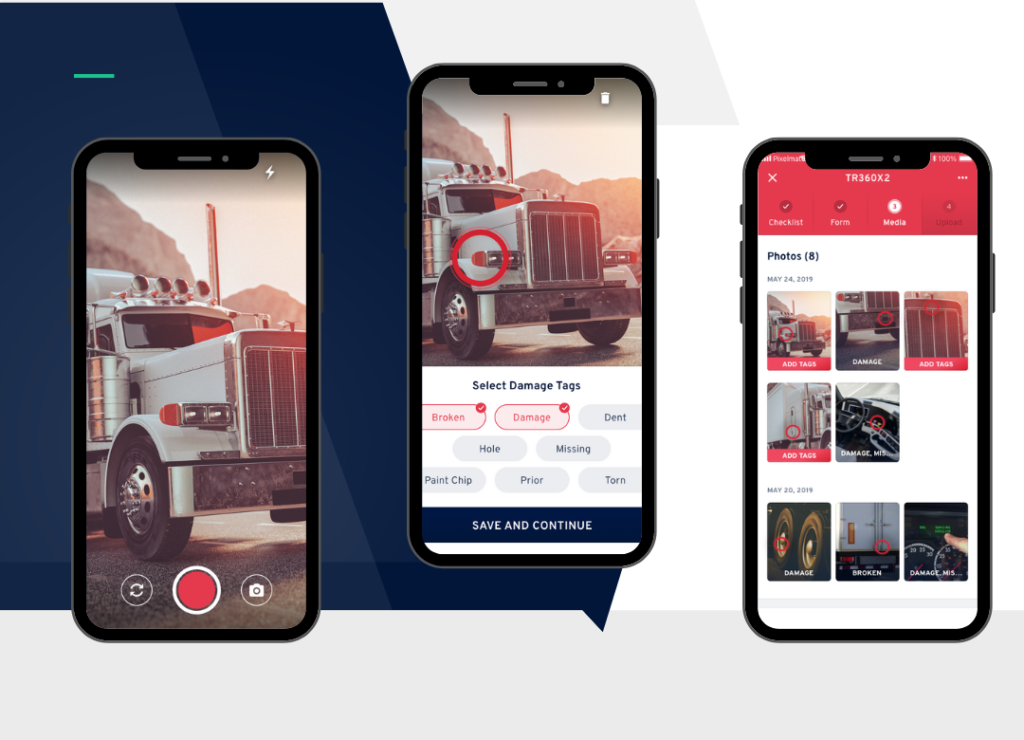
  1. Asset Tracking: Using mobile devices, companies can document where equipment was last inspected. Record360 permits users to scan barcodes/QR codes to identify and log the asset’s location based on its previous inspection. This marks its current condition with the help of geotags. 
  2. Maintenance Management: Companies can schedule routine maintenance by tracking asset maintenance history. This prevents unexpected breakdowns that can cause downtime or result in extra expenses.
  3. Damage Documentation: Businesses document the condition of their assets before and after use. This helps identify any damage caused by use or transportation. It also allows companies to figure out who handles paying for repairs.
  4. Reporting: Reports show businesses important information about their assets. This includes their last inspection, maintenance history, and damage reports. This helps companies to make good decisions about what to do with their assets.

Condition Reporting

Record360 is a digital tool used to manage a fleet or maintain equipment. Users can take pictures, videos, and write notes to document assets and create reports. Effective fleet management and maintenance are crucial for businesses. 

Record360 simplifies the process by letting managers track asset conditions. They can even document new equipment. Managers can find damage and determine repair costs while complying with regulations. This tool improves fleet and equipment management, bettering asset performance and lower costs.

  1. New receive: Document the condition of new equipment. 
  2. Fleet management: Document vehicle condition, including damage or wear and tear. It helps identify repairs and determine who pays for them. 
  3. Equipment maintenance: Keep equipment in good condition and avoid unexpected breakdowns that can lead to extra costs.
  4. Inspections: Document asset conditions during inspections. Inspections include safety, quality, and compliance. Issues can be identified and addressed. Compliance requirements can be met.

Claims Management

Record360 helps businesses manage claims. It provides clear documentation of pre-existing damage. It’s useful for insurance companies, trucking companies, and other businesses dealing with claims. By using the app, the claims process is quickened, and companies can save time and money.

Compliance

Record360 is essential for businesses in regulated industries. It assists in complying with regulations. Proper asset management is crucial for the success of businesses, especially those in transportation and manufacturing.

The software helps track maintenance and schedule routine tasks. This ensures assets are in good condition. Record360 also documents inspections, maintenance, and repairs, ensuring compliance with industry regulations.

Reports provide an overview of asset location, maintenance history, and compliance status. This software allows businesses to improve maintenance management and compliance processes. This leads to better asset performance, lower costs, and increased regulatory compliance.

  1. Maintenance management:  Track asset maintenance history, schedule routine maintenance tasks, and keep repair and service records. This keeps assets in good condition, addresses issues, and reduces unexpected breakdowns and extra costs. Proper asset maintenance is crucial for a company’s success. Using Record360, keeps assets in good condition, prolonging their lifespan and increasing profit.
  2. Regulatory compliance:  Simplify the regulatory compliance process. Document inspections, maintenance, and repairs. Keep assets maintained and compliant with industry regulations. 
  3. Reporting: Generate asset overview reports that include information on asset location and maintenance history. These reports help businesses make informed decisions about compliance and identify improvement areas.

Task Management

Record360 helps businesses manage asset maintenance, repairs, and inspections. It allows users to communicate with each other and with customers, insurers, and other stakeholders. 

Record360 generates reports that give businesses an overview of assets, condition reports, and claims. This helps them identify areas that need improvement and make decisions based on data.  This leads to more efficiency and reduced costs.

  1. Communication: Effective communication is crucial for businesses to maintain good relationships with stakeholders. This includes customers and insurers. Effective communication enables businesses to resolve disputes, schedule repairs, and maintenance, and update task statuses. By keeping everyone informed, businesses can provide better customer service. 
  2. Workflow automation:  Save time and increase efficiency by reducing manual work for asset management, condition reporting, claims management, and compliance. This reduces errors, leading to better data quality and decisions. 
  3. Reporting: Generate reports that provide an overview of assets, condition reports, and compliance status. These reports help identify areas for improvement and enable data-driven decisions. 

Record360’s platform provides a versatile solution for businesses to manage their assets, document their condition, and streamline their operations.

Record360 and Idealease Announce Preferred Supplier Partnership

Idealease and Record360 recently announced a national partnership to deliver preferred offerings to Idealease locations.

With this partnership, Record360 offers photo and video inspections to capture your truck’s actual condition from a mobile device. Record360 also provides and maintains current, approved versions of the Idealease preventive maintenance inspections for both power and trailer in the US and Canada. This will help you speed up your inspection process and ensure you’re always working from Idealease’s most current version.

Contact Damon Haber (dhaber@record360.com) to learn more and start a free trial of the Record360 platform.


The initial Idealease and Record360 offering includes:

Digital documentation tools are crucial to reduce or even eliminate damage disputes. Now, Idealease locations who use Record360 have the ability to submit inspection reports and capture digital signatures, all in one place. With Record360 you can:

  • Take photos & videos to capture the (actual) condition of your truck
  • Fill out Idealease-approved preventive maintenance inspection forms
  • Automatically upload inspections to the Idealease Vehicle Maintenance module – no need to manually submit them!
  • Capture digital signatures
  • Access historical inspection records
  • Identify damage trends


Comments on the news:

“Over the last year, Idealease locations have become quite successful with Record360,” Damon Haber, co-founder of Record360 noted. “We are excited to strengthen our relationship with Idealease and start offering a customized product for their locations. This will empower their businesses to grow even more efficiently.”

Andy McEnaney, VP of Affiliate Services at Idealease said, “Our Record360 partnership will, without a doubt, decrease damage disputes and save valuable time in conducting standardized inspections for Idealease locations. Locations that have already begun using Record360 are beginning to realize these reductions.”

Furthermore McEnaney noted, “There are a number of new technologies and regulation changes coming to the transportation industry in the next several years. The ability to customize and electronically address these changes—virtually on demand—will help maintain our locations’ efficiency.”


Pricing and availability:

Idealease pre-built forms and workflows are now available to Idealease locations for purchase. To learn more, reach out to Damon Haber (dhaber@record360.com).

6 Digital Transformation Tips for Heavy Equipment Rental Companies

Are you sick and tired of managing heavy equipment rentals with paper-based systems? Imagine running your operations with just a few clicks of a button. Imagine recording and tracking your rentals through your smartphone or tablet. How about eliminating the need for paper forms and manual filing? You can accomplish all these tasks by digitizing your heavy equipment rental business.

What is a Digital Transformation?

Digital transformation integrates technology to replace or improve outdated, manual business processes.

In addition to better operational efficiency, digital transformation also enhances customer-facing operations, like sales, product education, troubleshooting, and dispute resolution. 

Going from paper to paperless is an example of digital transformation at work. 

Software programs can digitize your bills, reports, and contracts, among other paper documents, so you can save and share your documents through the cloud. This significantly reduces the manual labor needed to file, organize, and retrieve the correct information. 

Must-read: 5 Benefits of a Truck Inspection App


6 Tips to Transition from Paper to Digital Inspections

Here are six tips for a more seamless transition: 

1. Identify the documents you need to digitize

Identify the document types that must be prioritized in the digitization process. Examine the documents you frequently access and share, like contracts, job orders, invoices, bills, and inspection reports. It’s also important to save a soft copy of important, though not often used, business documents, such as articles of incorporation, business licenses, etc. These documents must always have a hard copy, but digitizing them for backup is crucial. 

Unless you need to share digital copies of business documents soon, prioritize digitizing frequently-accessed papers first. Organize documents into groups and schedule a date and time for their digitization. 

Tip: Consult stakeholders, including warehouse managers, mechanics, coordinators, and sales managers, to identify documents that must be digitized. Your staff should have quick access to documents crucial to their tasks to avoid needless bottlenecks.

2. Plan your cloud-based ecosystem

Plan and configure your cloud-based ecosystem before creating digital documents. If necessary, start with a cloud storage solution to house your digitized documents. Some examples of reputable cloud storage products for businesses are Microsoft OneDrive, Amazon Web Services, and Google Drive.

Consider the following factors when choosing your cloud storage solution:

  • Storage capacity: How much cloud storage space do you need for your documents (and additional documents to be saved in the future)?
  • Cost: How much does the cloud storage solution cost per month?
  • Features: What tools and functionalities does the cloud storage solution offer for data management and sharing?
  • Security: Does the cloud storage solution have a proven track record of data security?
  • Integrations: Does the cloud storage solution support integrations with the software you already use?
  • Sharing: Is it easy to share saved files?

3. Choose your rental software

Pick specialized equipment rental software to streamline essential business processes, increase employee productivity, and enhance the customer experience. Some key features to look out for are: 

  • Employee management
  • Transparent inspections
  • Paperless customer experience
  • Keep secure records on the cloud
  • Integrate with third-party apps

4. Start digitizing 

With the software side of digital transformation ready, start scanning your documents. You can use tools like Adobe Scan to convert your paper documents into PDFs automatically. These applications can also help you compress documents to save space, save using editable file formats, protect sensitive files with passwords, and more.

5. Plan the onboarding process for employees

Build an onboarding process to help your employees adapt to a digital environment. Ensure to only roll out drastic changes in your business operations if you provide your staff with sufficient training. Implement changes incrementally to give employees enough time to learn new systems. Consider compiling an accessible learning resource library into your cloud storage, including video tutorials, guides, and FAQ pages. Your cloud-based applications should have these resources available on their website.

6. Implement a tracking system

Improve the adoption and support of your new digital business ecosystem by tracking analytics and rewarding top performers. Use project management platforms to plan digital transformation objectives, share resources with your team, and track performance analytics. 


How to Digitize Your Paper Inspections with Record360

Take your first step towards complete digital transformation today by setting up Record360. Below are ways to integrate paperless rental inspections into your business: 

Manage your task calendar

Create a central “task calendar” to keep key stakeholders on the same page—whether in the office or the field. According to Joel Cook, EVP of Komatsu West, Record360 is “actually very easy to implement.” Cook added, “Everybody was excited to have it, and I never heard any employee complaints.” 

From the Record360 dashboard, prep up the task’s details, specify an assignee and deliver a task link straight to their inbox in minutes. Record360 tasks can contain due dates, priority levels, job locations, and descriptions to ensure everything runs smoothly. Get a bird’s-eye view of your tasks from the Record360 dashboard. Sift through your list using filters or by sorting tasks according to status, due date, type, and so on.

Unlock the power of digital inventory management

You can track your inventory and schedule inspections via the Record360 platform. Use the desktop interface to view your unit’s location and recent media (photos and videos). Easily find damage-flagged units, check their location, and review their inspection history. 

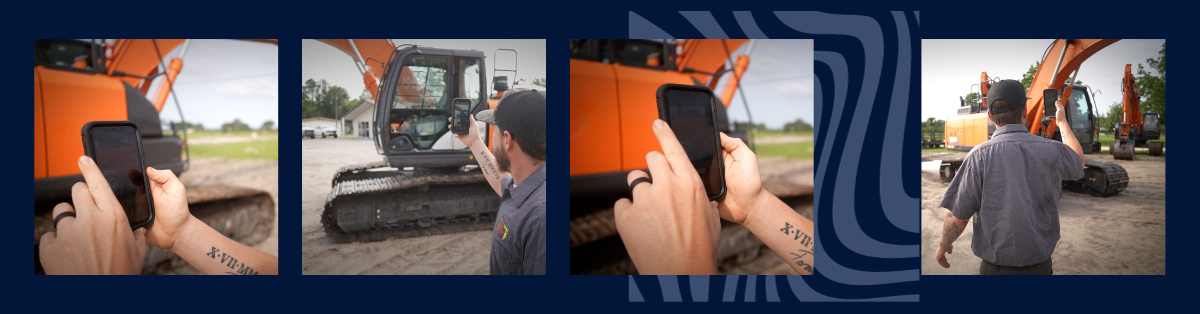
Schedule inspections on the unit details page or directly from the list view. Fill in the required details, build your inspection checklist, and upload the forms to your Record 360 cloud. No need for a separate heavy equipment, auto, or truck inspection app—employees can send documents and request digital signatures from customers through the Record360 mobile app. 

“I know everybody wants to save every dime they can and make every dime they can make,” says Robert Marvin of Preferred Rentals. “If you’re spending it on somebody else’s damage, you’re not making it.”

Speed up customer transactions

Use heavy equipment and truck rental software to enhance the customer experience, fast-track rentals, and take the pain out of damage disputes. Obtain your customers’ signatures digitally and streamline transactions. Receive customer-signed documents automatically through email and view all signature requests through the Record360 dashboard.

Apart from streamlined digital signatures, Record360 also provides customers with a transparent condition report of heavy equipment via the mobile app. This creates a frictionless equipment rental process from start to finish—all while freeing your construction equipment rental business from tons of unnecessary “desk work.” 

Resources You’ll Love

Go Digital with Record360

Use Record360 to transform your heavy equipment rental business from paper to digital.

Our app helps you cut costs, streamline inspections, augment inventory management, and protect your assets from damage—all while keeping your customers happy.   

Request a demo today and discover the future of heavy equipment rentals!

Ready, Set, Inspect: What’s New in Record360, Q4 2022

Last quarter, we released a number of exciting features across our two products: InspectPro & ServicePro. Read on for our latest features below.

ServicePro: Work Order History on a Unit

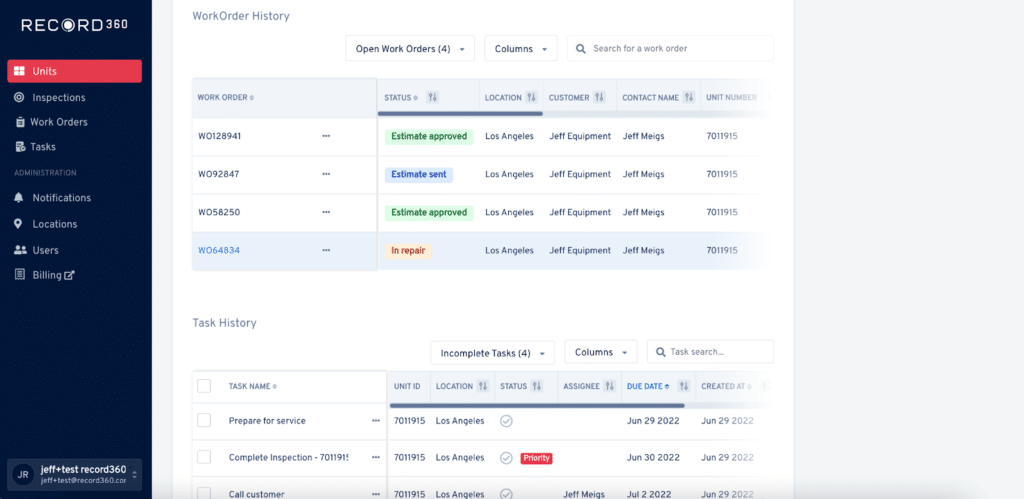
View your work order history directly from the units page. Understand the service history on that particular unit, so you can recommended needed service or prep the unit for sale.


ServicePro: Desktop Notifications

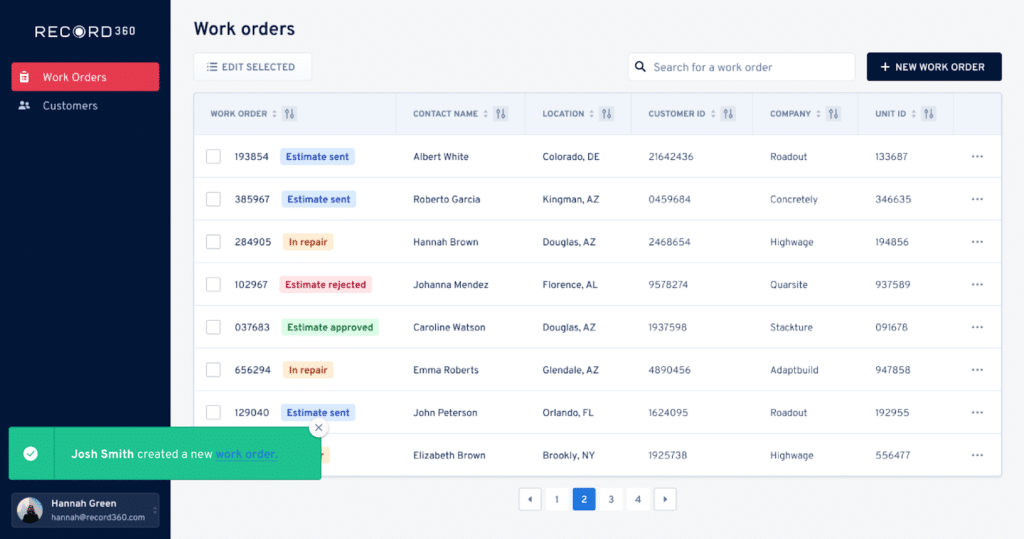
Get real-time notifications on your desktop computer for all events on a work order. Quickly see whether someone left you a new comment, your customer responded to a text message, or a new inspection is available.


ServicePro: Reporting

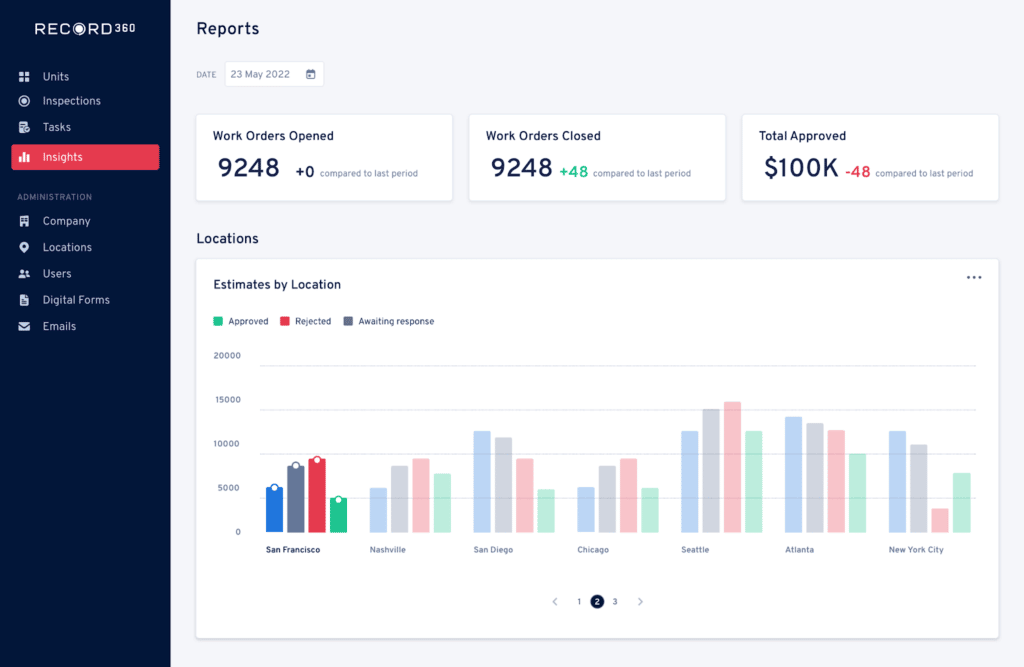
Improve your operations by analyzing service activity across your team. Our new reporting tool shows you:

  1. Total $$$ estimates approved by location (so you can see which of your locations are generating the most service revenue)
  2. # of text messages sent by service writer (so you can see who is communicating the most with your customers)
  3. % of work orders with inspections (so you can make sure 100% of your serviceable equipment is getting inspected)
  4. And more!


ServicePro: Message Templates

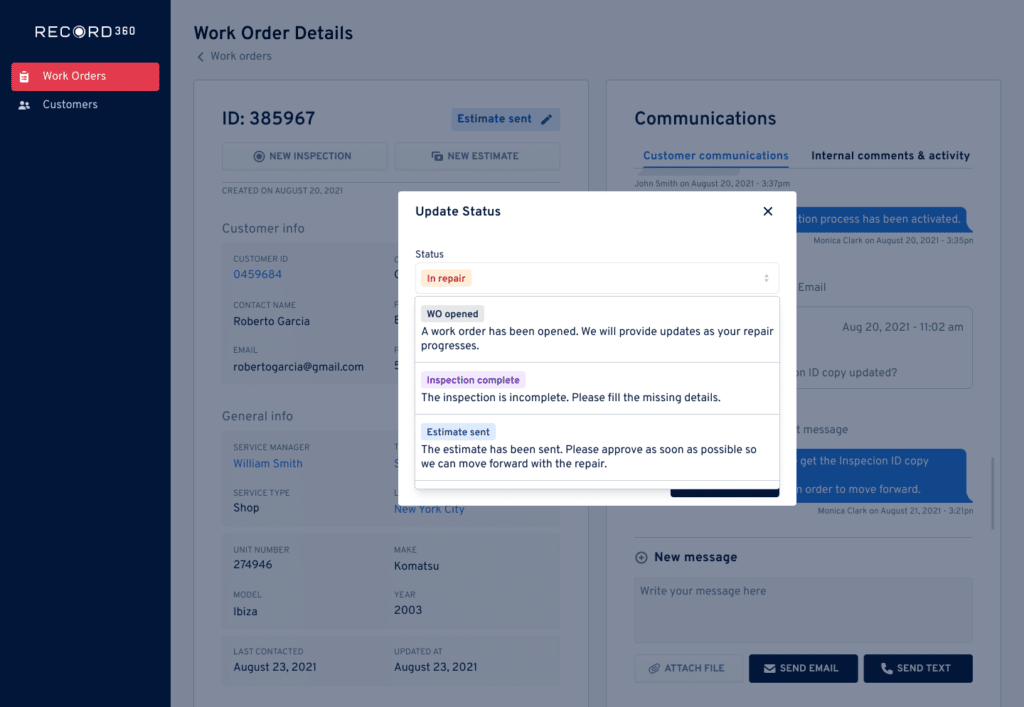
Create default messages to send to your customers based on work order status. Save time & ensure your service managers use the same approved language every time.


ServicePro: Customer Satisfaction

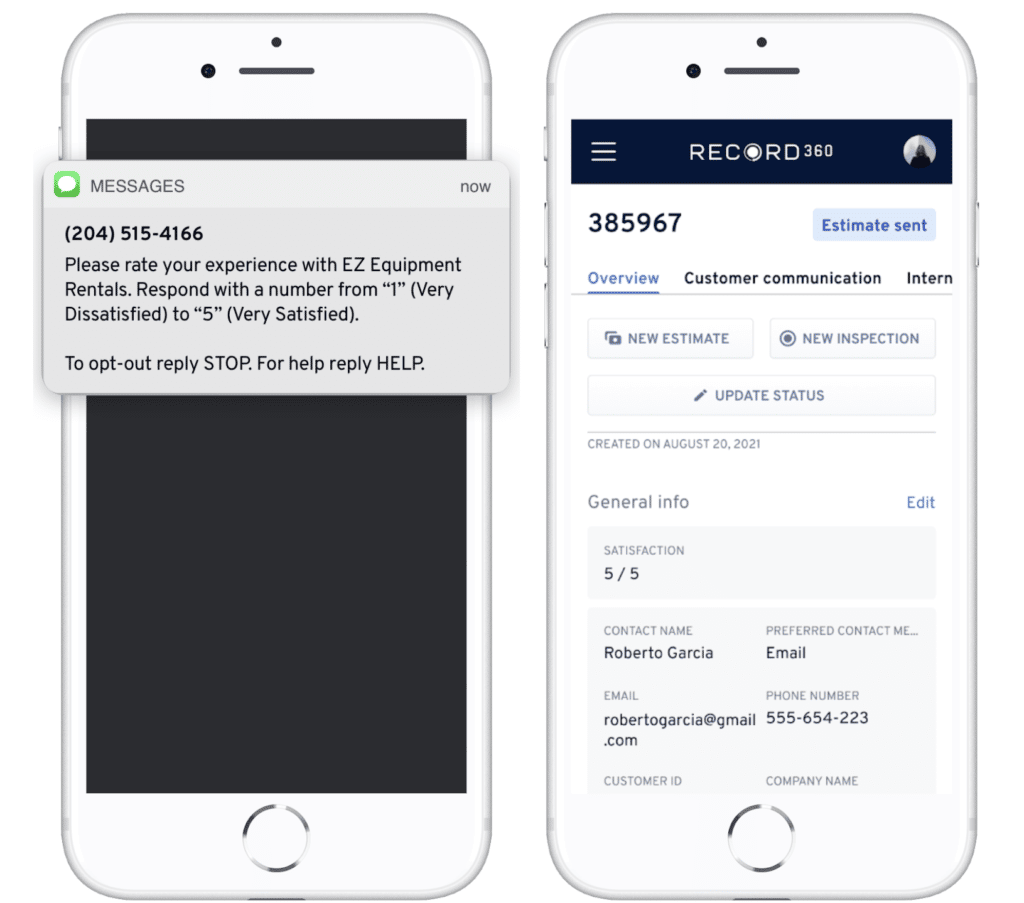
Automatically send satisfaction surveys to your customers via SMS or email after a work order closes. Use our reports tokeep track of how your scores are trending, so you can see improvement over time.


ServicePro: Other Additions

  • ➕ Add inspections to work orders: Add existing inspections to a work order, so you can quickly track damage claims.
  • 📷 Select media on work orders: Select media and attachments on work orders, so you can have more control over what you send your customers via SMS.
  • ✉️ Custom email templates: Add your company logo & colors to our ServicePro email templates, for a more personalized look & feel.
  • 📎 Attachments on work orders: Attach files to your work orders (like quotes or rate sheets) and send them to your customers via SMS or email.


InspectPro: Enhanced Departments

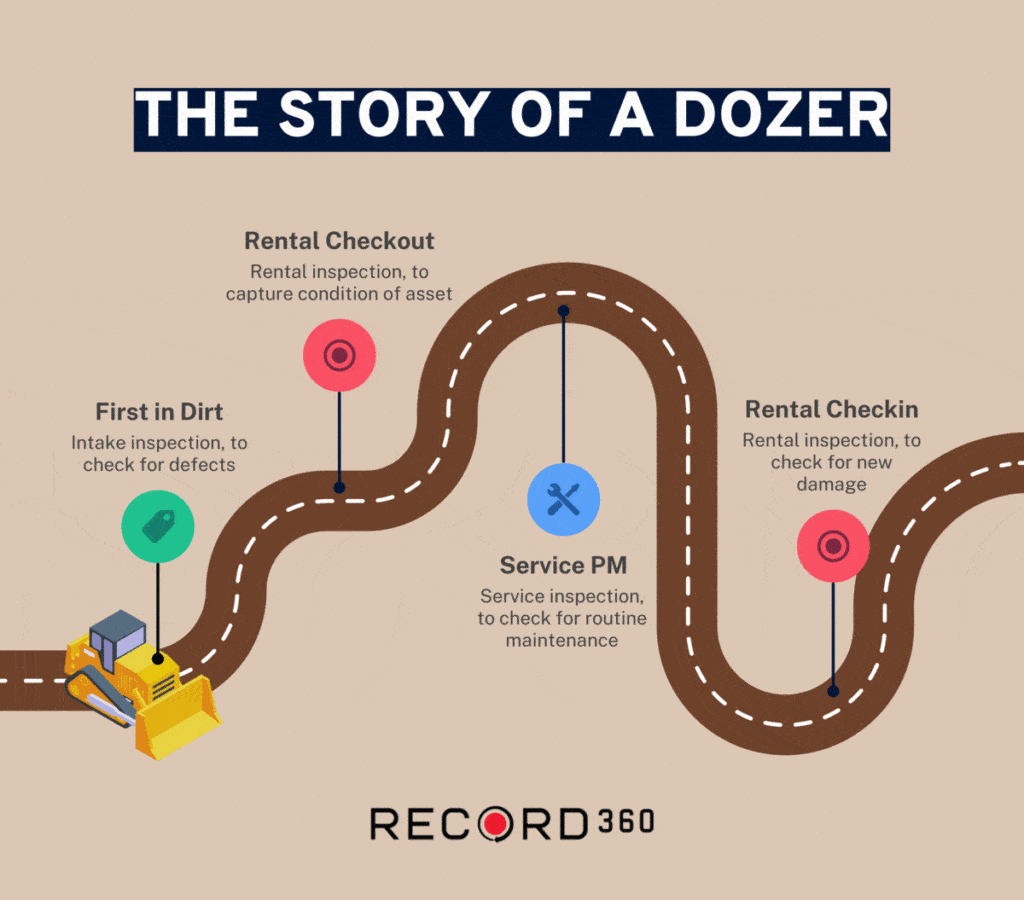
Departments just got more powerful. You can now run multiple workflows in Record360 at the same time. Need to do a service inspection while a unit is out on rent? No problem. Simply check the unit out with a rental inspection, complete the service inspection when needed, and check the unit back in at the end of the rental. No need to interrupt your rental process.

What’s New: Departments, but Make Them Supercharged

If you haven’t seen… our Departments functionality just got more powerful. You can now complete multiple inspections across your departments & workflows at once, without interruption. Connect your entire business’ inspection process in Record360.

Need to do a service inspection while a unit is out on rent? No problem – simply check the unit out with a rental inspection, complete the service inspection when needed, and check the unit back in at the end of the rental. No need to interrupt the rental inspection process. Your teams can operate their own inspection processes without affecting another team.

The Story of a Dozer

Perform Multiple Inspections on an Asset at a Time

Record360 now allows you to perform multiple inspections on an asset at the same time, across departments and workflows. From intake inspections to rental, service, DOT, re-marketing, and beyond… all your work can happen in parallel.

Integrate Inspections Across Your Business

Inspections aren’t just for rental. The need for service, maintenance, warranty, and re-marketing inspections is increasing. Let Record360 be the hub for inspections across your business, to track the condition of your assets across their lifecycle.

The Record360 suite of products is the easiest way for you to upgrade your customer experience. Create digital inspections, sell used equipment & enable your service department—all in a single tool. Want to get started? Sign up for a demo here!