See Record360 at Bauma 2025: April 7-13, Munich, Booth C4-719

record_360

5 benefits of a truck inspection app

Using a truck inspection app eliminates the tedious and time-consuming tasks of manual, paper-based processes.

Not only do manual processes make your truck inspection process inefficient, they also cause you to lose time and money. You need to go the paperless route.

A reliable truck inspection app can speed up your inspection process and save you and your staff tons of precious work hours and resources. 


This guide covers five benefits of using a truck inspection app and how it can improve conducting your vehicle assessments. 

1. Speed up your inspection process

The traditional way of conducting a truck inspection is often a headache with all the paperwork you must fill out, file, and organize.

It can also be a long and tedious process that wastes time and resources, particularly if you have a large fleet with over 50 trucks in and out daily. 

A truck inspection app provides a streamlined solution, allowing you to conduct paperless, electronic assessments seamlessly. 

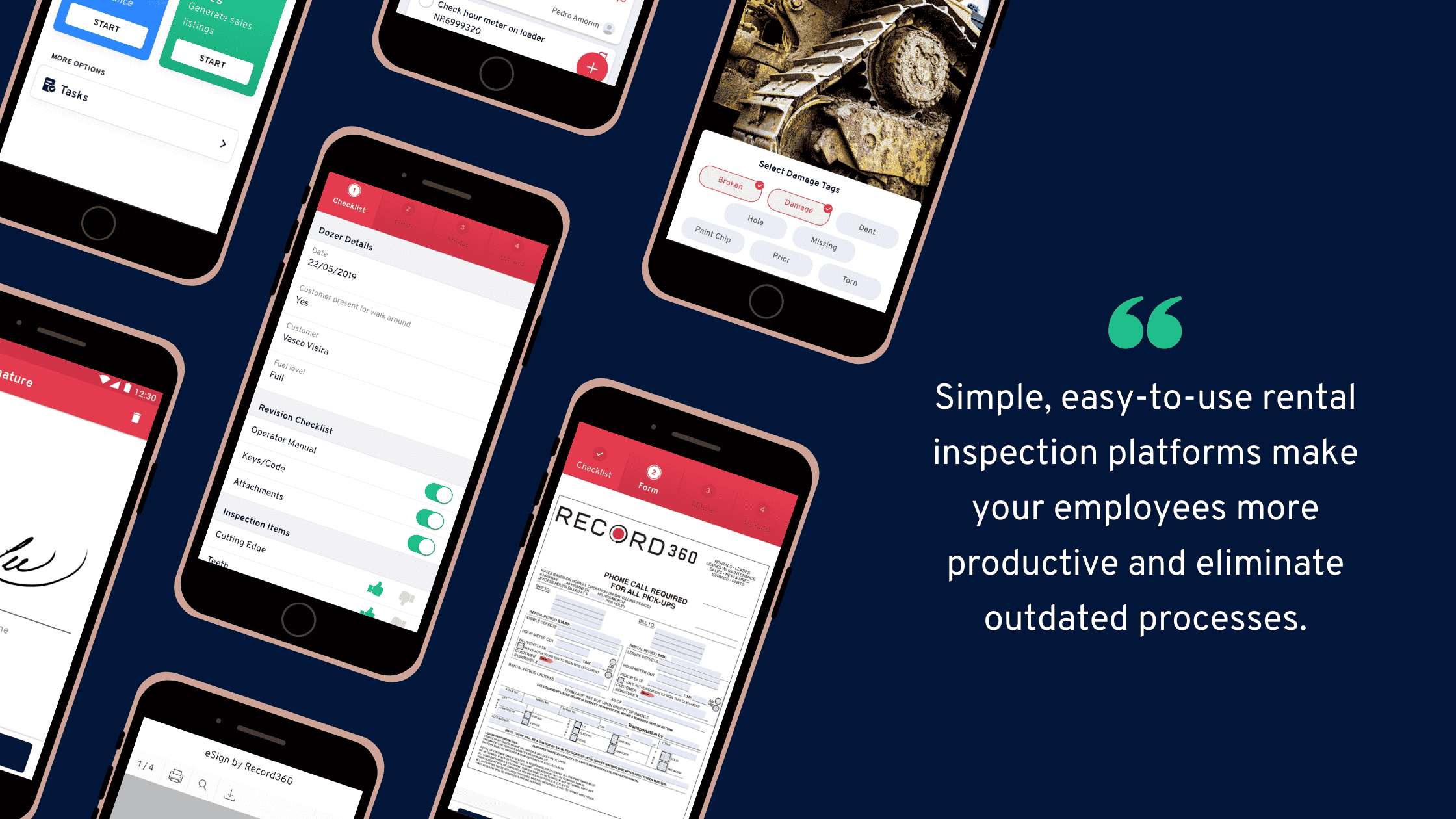
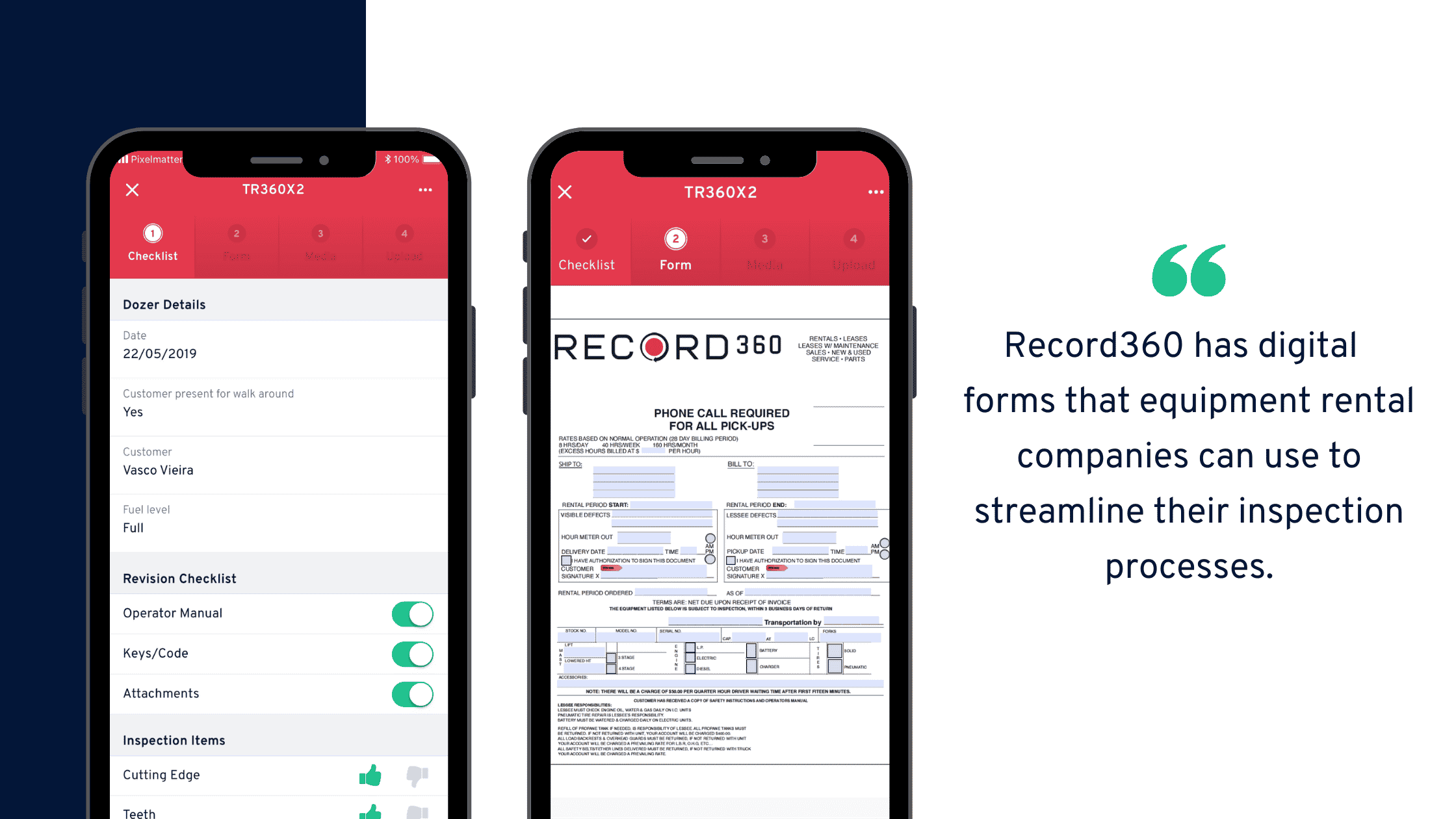
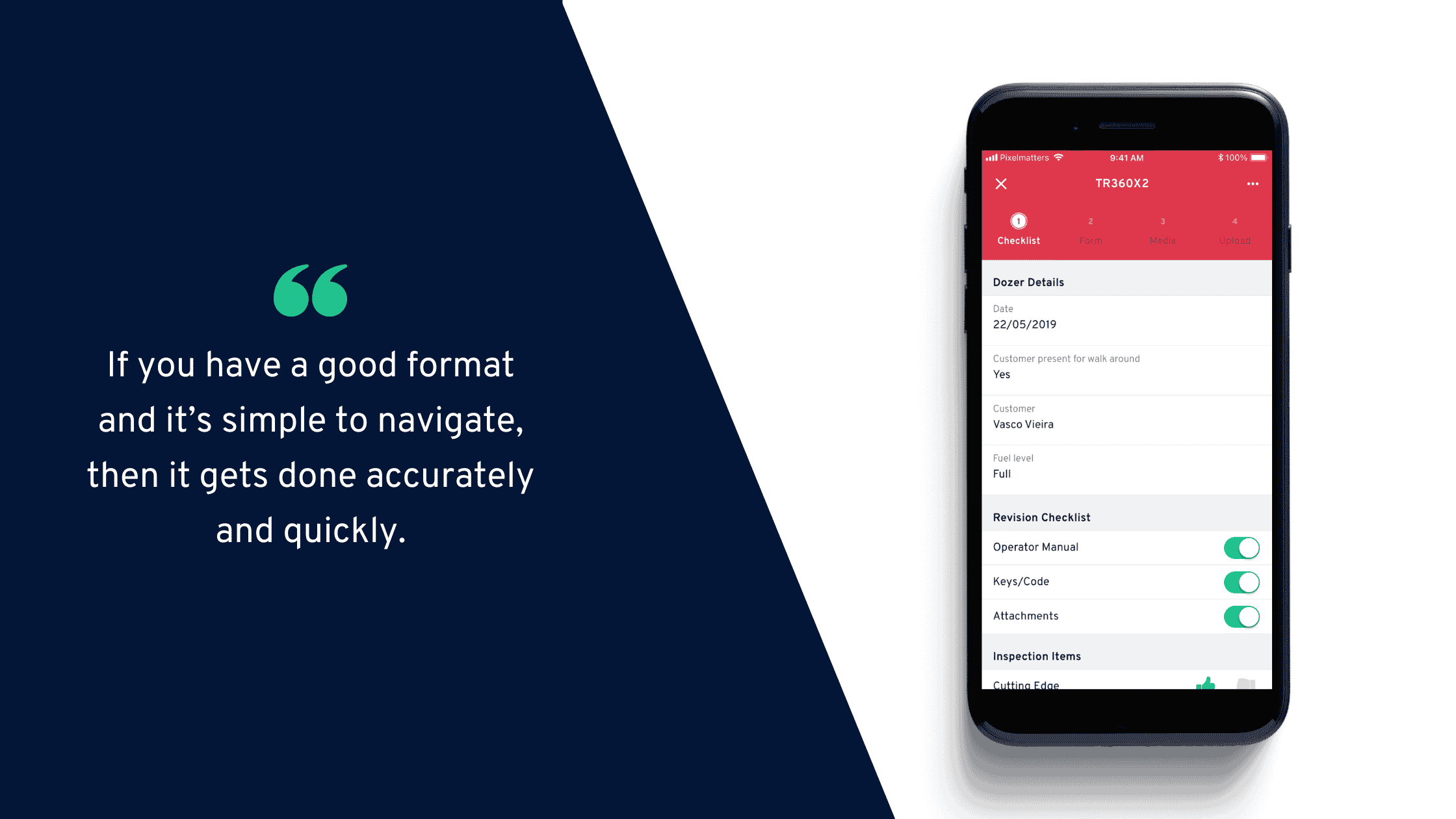
The Record360 app provides an easy digital checklist and truck inspection form right from your mobile device. This cuts down significantly on the time and effort it usually takes to complete, send, and get signatures on paper-based inspections.

Must Read: Electronic DVIR for Truck Inspections: Improving Safety and Efficiency

Blog-5-benefits-of-using-a-digital-equipment-inspection-form (1)

The app lets you record all your data in a standard format. You can also modify your checklist and forms without the hassle of printing out tons of paper.

After filling out the digital commercial truck inspection forms, the app lets users send them directly to managers through email with a few taps. 

A dependable app can also secure your data stored on the cloud, giving you the peace of mind of knowing your inspection information is safe and only accessible to authorized users. 

2. Record vehicle condition anywhere

One of the advantages of using a truck inspection app is it lets users perform vehicle assessments, whether on-premise or on-site. 

It simplifies your commercial truck inspection process and conveniently allows anyone from your team, contractors, and even customers to assess your vehicles and capture your asset’s real condition anywhere and anytime. 

For instance, Record360 allows you to send drivers and contractors a direct link to Record360, allowing them to perform inspections wherever your trucks are deployed. This gives you instant access to remote inspection information, helping you detect damages promptly. 

You can set alerts to trigger when damages are detected during truck inspections, helping you act on damages in real time. 

With a truck inspection app, you can easily begin inspections from your desktop and send them to your team to complete in the field using their mobile devices.   

You can take high-definition photos and videos to capture your truck’s damages and actual condition and, in turn, make your inspections simple and easy. 

Must Read: Trucking Inspection Checklist: Importance, Components, and Benefits

3. Streamline getting signatures 

Getting managers and customers to sign off on paper inspection reports can be a long and tedious back-and-forth process. 

Save time and energy by using Record360 to obtain electronic signatures from the app. 

Instead of a paper truck inspection form, you can capture electronic signatures on your digital forms and auto-email them to customers, speeding up the process. 

Must Read: The importance of electronic signatures for equipment inspections

Copy-of-Blog-Winning-rental-businesses-are-transforming-their-business-with-inspection-management-software (1)

Once signed, you can store the reports in a secure dashboard for easy access and efficient record keeping. This also helps optimize your truck fleet management processes.  

4. Centralize your inspection data

Paper-based truck inspection records can be challenging to accomplish promptly and accurately, but they can also be a nightmare to file, keep track of, and access. 

A truck inspection app allows you to upload and store all vehicle assessment records in one central location. This provides quick and easy access, streamlining your workflows and truck fleet management tasks. 

With consolidated commercial truck inspection records, you can pull record histories, identify trends, and analyze your data. 

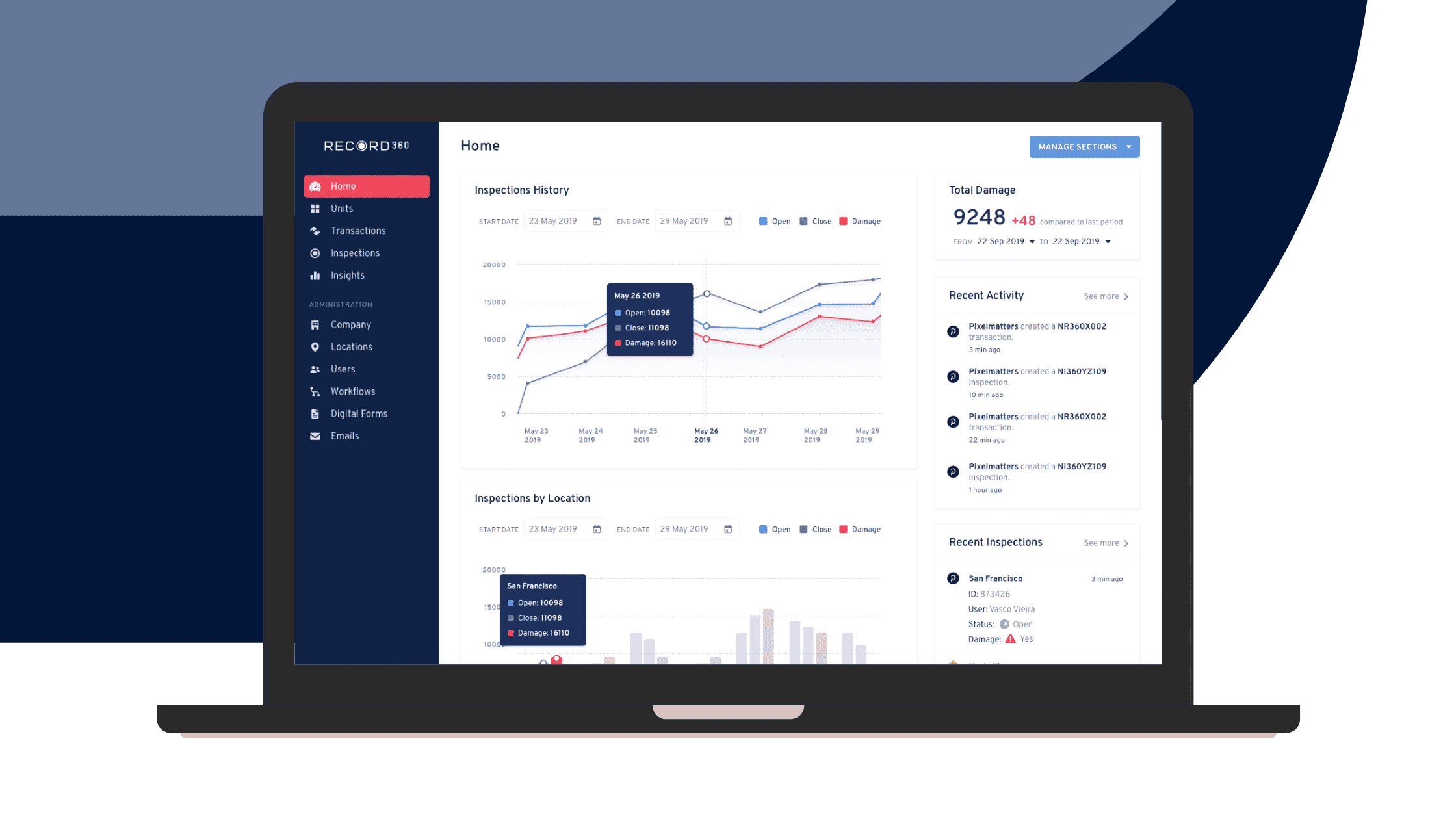
For instance, the Record360 web app offers a comprehensive dashboard to help you stay on top and gain insights from your truck inspection information. 

You’ll get instant views of your inspection history, the number of total damages, recent activities and inspections, and other valuable data. This can help you make better decisions and identify areas to reevaluate and improve. 

Blog-Top-11-equipment-inspection-software-features-3 (1)

You’ll get real-time information with all your inspection records and other data on your transactions and units. You’ll have full access to everything you need to understand your fleet’s condition through damage analytics, past inspections, and employee usage (among others). 

As such, a truck inspection app that centralizes your data helps managers stay on top of your inspections and related processes and keeps everyone in the loop. 

5. Establish efficient inspection workflows

Conduct seamless truck inspections to streamline your workflows so you spend more time and resources on renting and, in turn, increasing your revenue. 

A truck inspection app frees you and your team from time-consuming paper-based processes, allowing you to perform vehicle assessments efficiently. 

Apps with custom-built truck workflows, for instance, simplify and streamline your inspection process. 

You can complete an entire truck inspection in minutes, whether for an incident report, service inspection, appraisal, lease inspection, prep for sale, or lease inspection. 

With the app, you can cover more ground with less effort than manual, paper-based methods, optimizing your truck inspections.

Efficient inspections and workflows also mean you can spot truck damages and act on them quickly. This helps you avoid potential issues, eliminate costly damage disputes, and protect your assets and business. 

Must Read: Streamlining Truck Inspection Checklists with Record360

Start leveraging the game-changing advantages of a truck inspection app

Preserve your fleet’s quality and protect it from costly damages by streamlining your truck inspection process.  

Take away the headaches that come with traditional methods. 

Equip your team with a dependable truck inspection app that provides easy-to-use and access digital forms, robust damage and data recording features, a central data hub, and in-app signature capturing (among others). 

If you want to leverage these powerful features to optimize your truck inspections, schedule a demonstration with Record360 today.

How digital inspection tools can protect your customers

Using the right digital inspection tools will help protect your customers.

Consider the potential lawsuits or hefty penalties you might face if your equipment breaks down while on rent. You need to give due diligence to choosing an equipment inspection software for your company.

What’s more, a reliable inspection tool adds other value to your rental company: it also increases your team’s productivity and reduces your business expenses.


So the question becomes, how exactly do reliable digital inspection tools help you protect your clients?

1. Digital inspection tools prevent customer fraud

Although physical rental and inspection processes involve identity validation, they lack security. Manual methods are less robust and reliable compared to electronic ones.

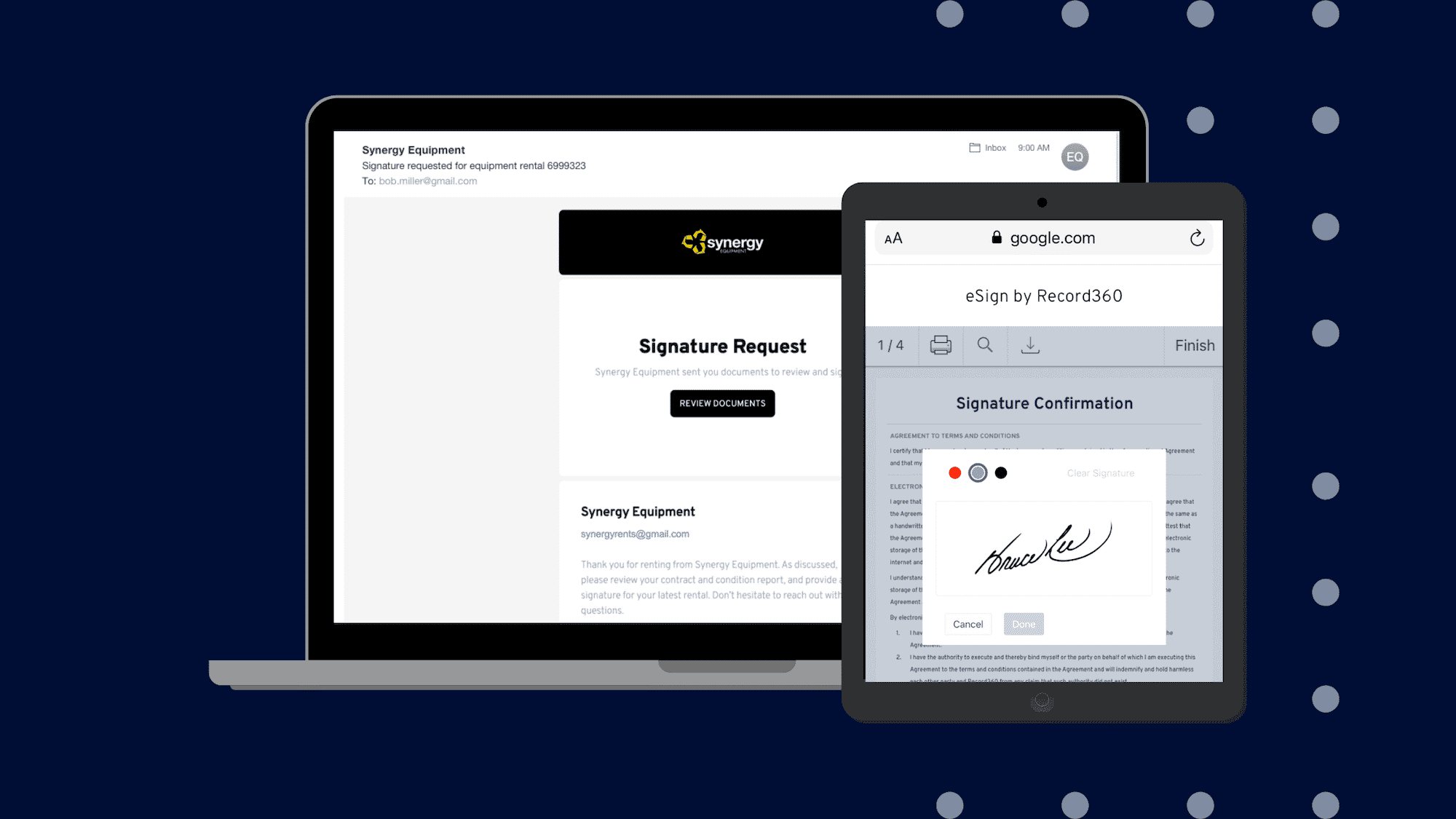
For example, the Record360 equipment management app captures clients’ electronic signatures for equipment log sheets, inspection sign-off documents, and rental agreements. It also automatically emails these signed files to the signees for their reference.
Copy-of-Blog-Winning-rental-businesses-are-transforming-their-business-with-inspection-management-software (1)

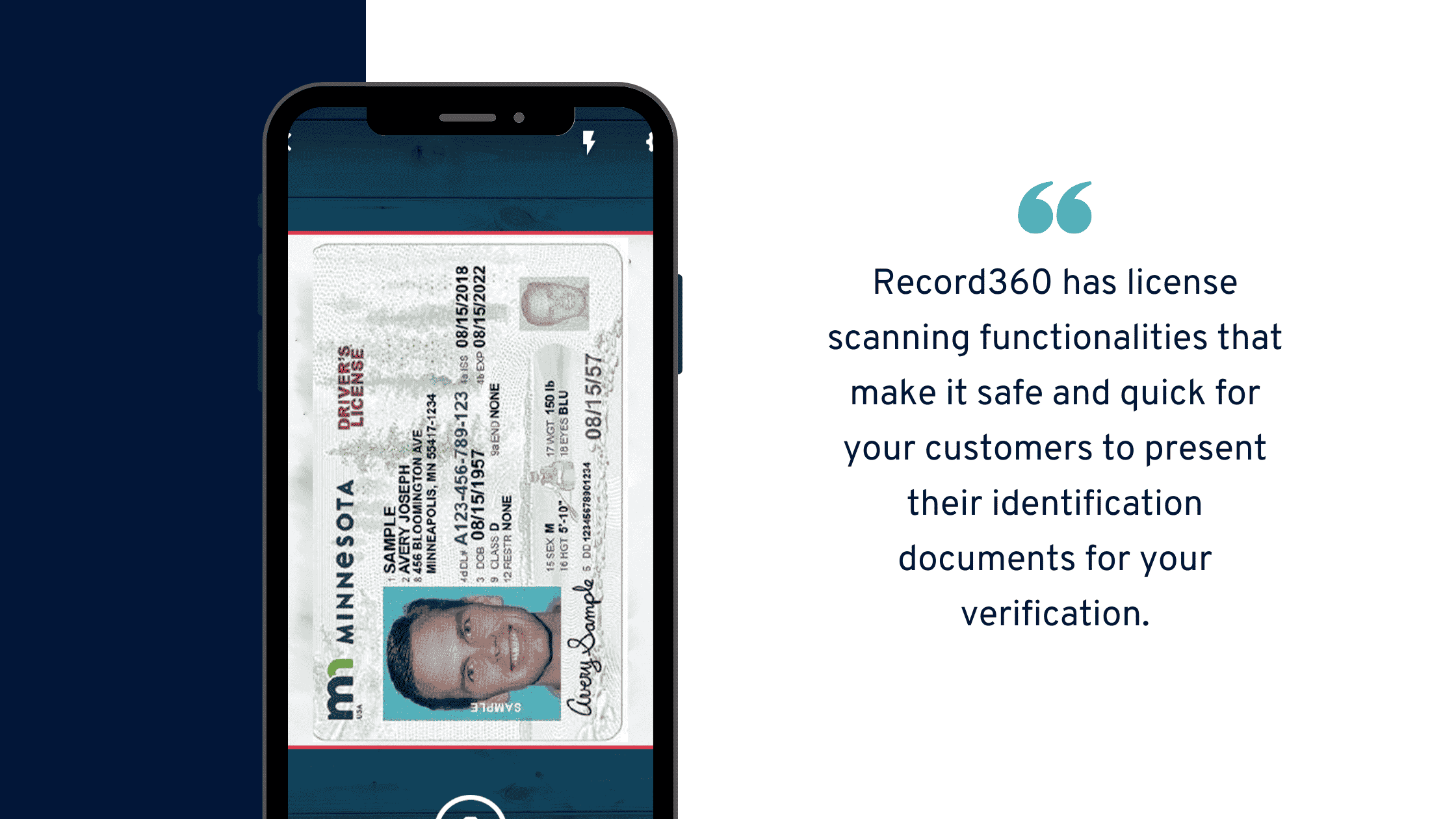
The software even has license scanning functionality that efficiently validates customer identity and lets clients safely present confidential documents (especially during the ongoing COVID-19 pandemic).
Blog-Top-11-equipment-inspection-software-features

That way, your customers and staff can better verify that the business and transacting party are accurate and legitimate.

Record360 then places these digital signatures in secure cloud storage for quick, safe access when needed.

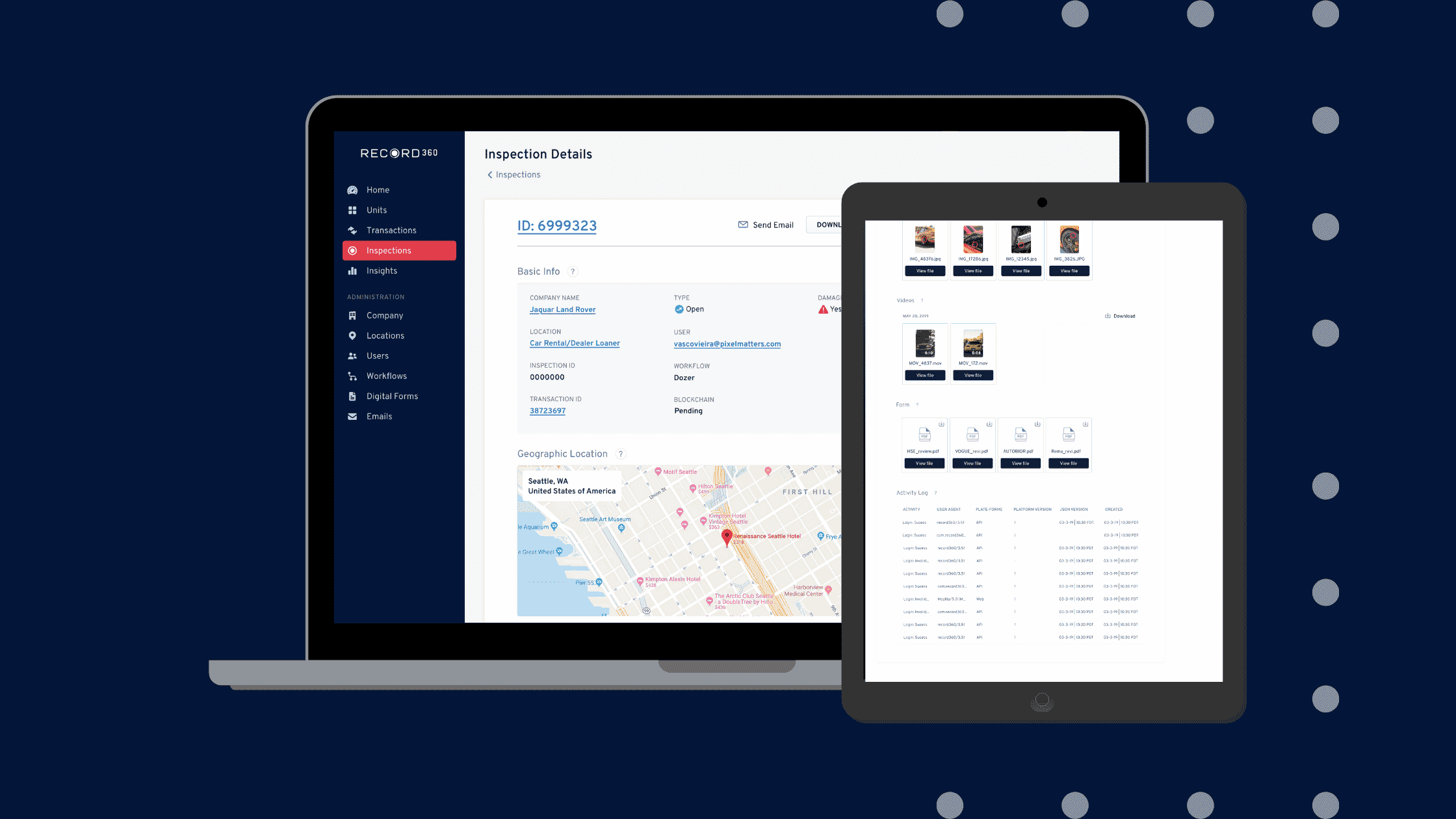
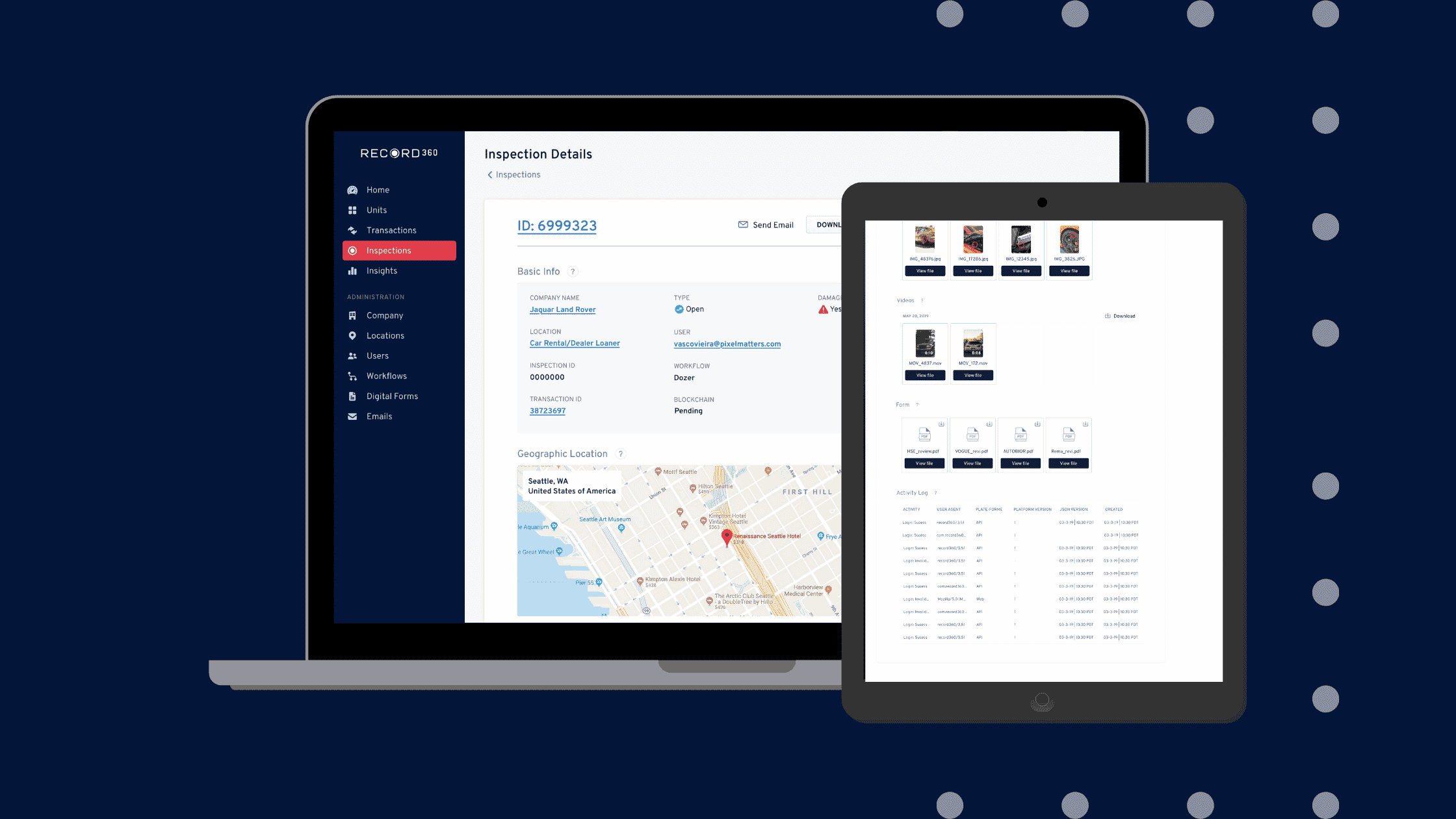
Digital inspection tools also store equipment and inspection records with details about rental usage and asset condition. In the Record360 dashboard, you can find rental inspection history, activity logs, user history, and date and time stamped evidence.
Blog-Top-11-equipment-inspection-software-features-6

2. Digital inspection tools bolster customer safety while out on rent

Digital inspection tools help enhance your assets’ condition, equipment inventory management, and, consequently, your customers’ safety while renting out your machinery.

Electronic software allows you to scrutinize and record any defects more closely and accurately, apply necessary repairs promptly, and follow the right maintenance schedules.

Record360 has various functionalities suited for that. 

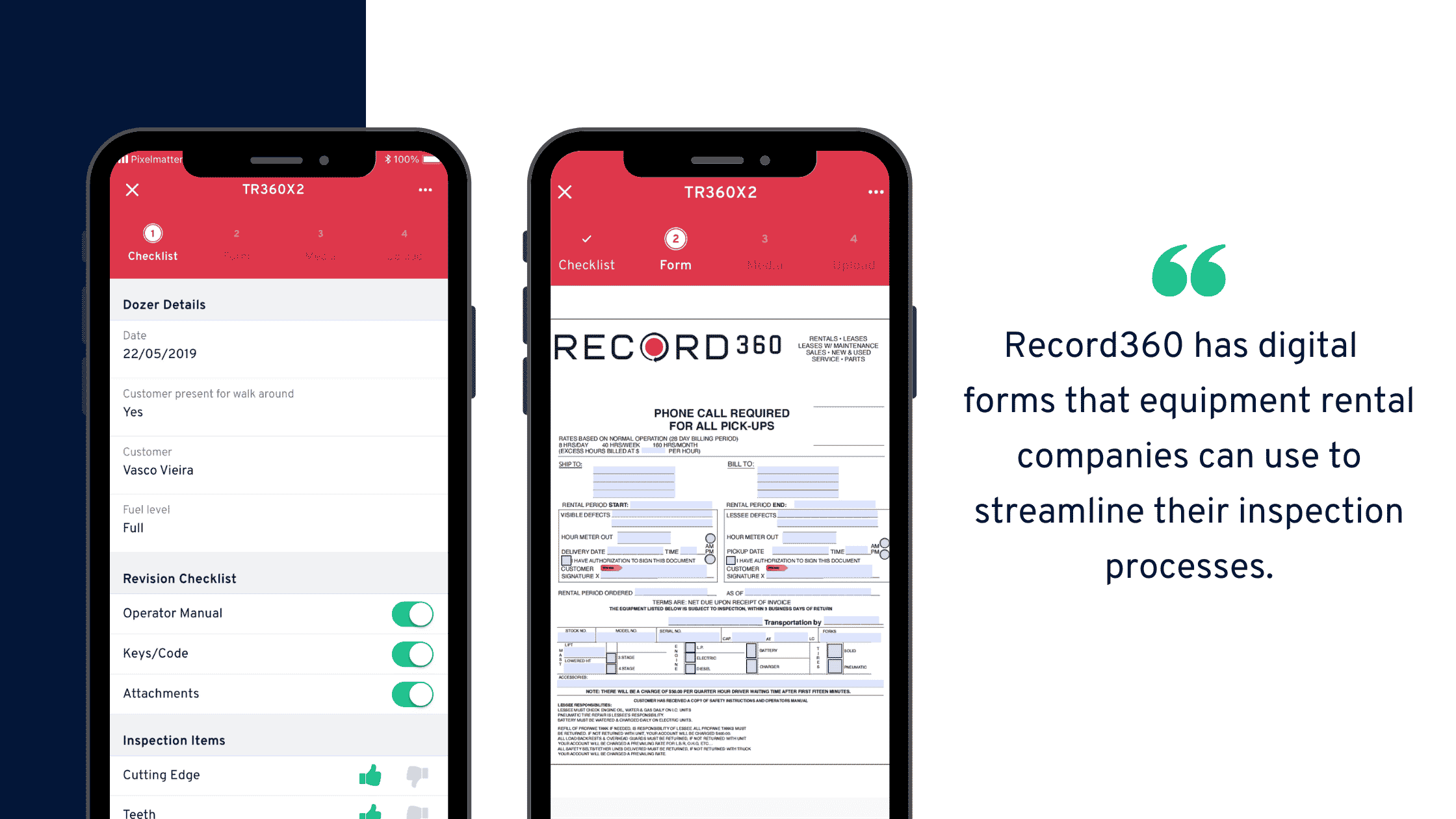
On the awareness side, it lets your staff perform inspections from any branch and fill in the digital equipment inspection checklists and forms to report the asset condition, especially if there’s any damage.
Blog-5-benefits-of-using-a-digital-equipment-inspection-form (1)

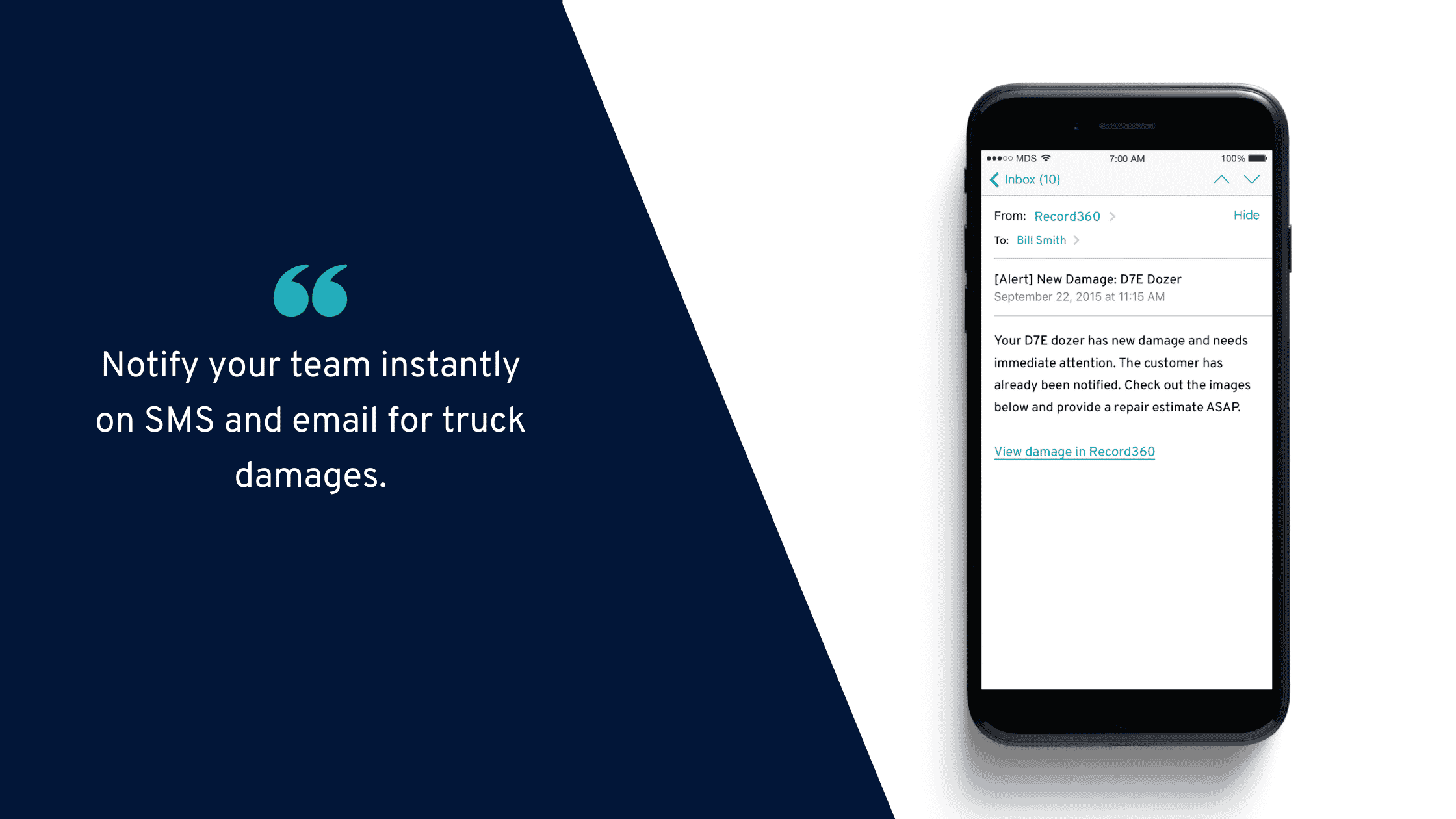
For reporting, Record360 then instantly disseminates information from the inspection form to you and the team via email and SMS.
Blog-Commercial-truck-inspection-mistakes-you-need-to-avoid-1

You can also view the details about damages, needed repairs, and equipment maintenance schedules and activities for every asset on your Record360 dashboard.

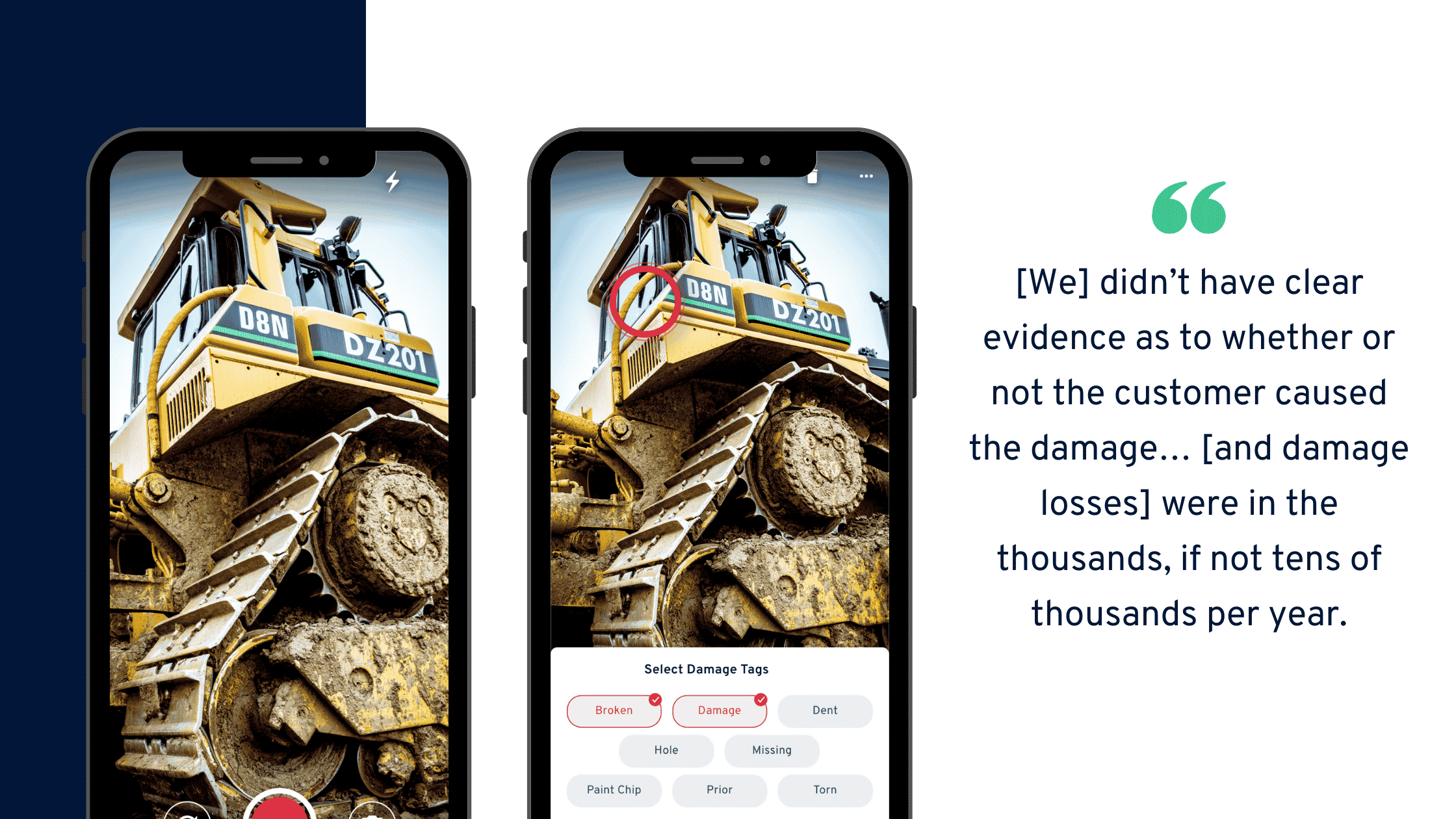
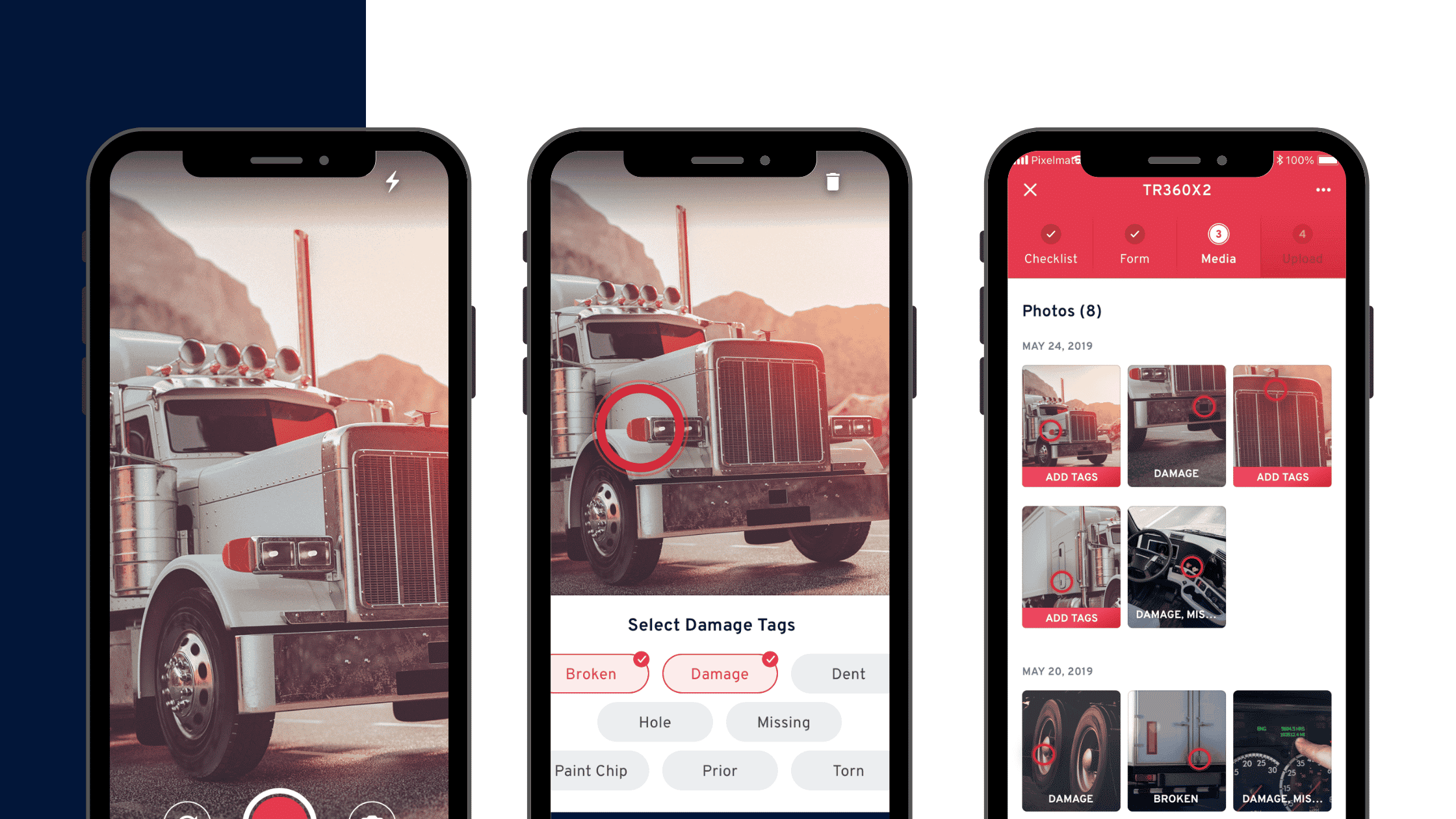
During the inspection, your technicians and operators can take high-resolution equipment photos and videos of the asset’s defects and apply appropriate “damage tags” on them.
Blog-Commercial-truck-inspection-mistakes-you-need-to-avoid (2)

You can then monitor these equipment inspections and get real-time updates, location details, and activities to ensure the assets are being repaired and maintained — ready for the next customers’ safe use of them.

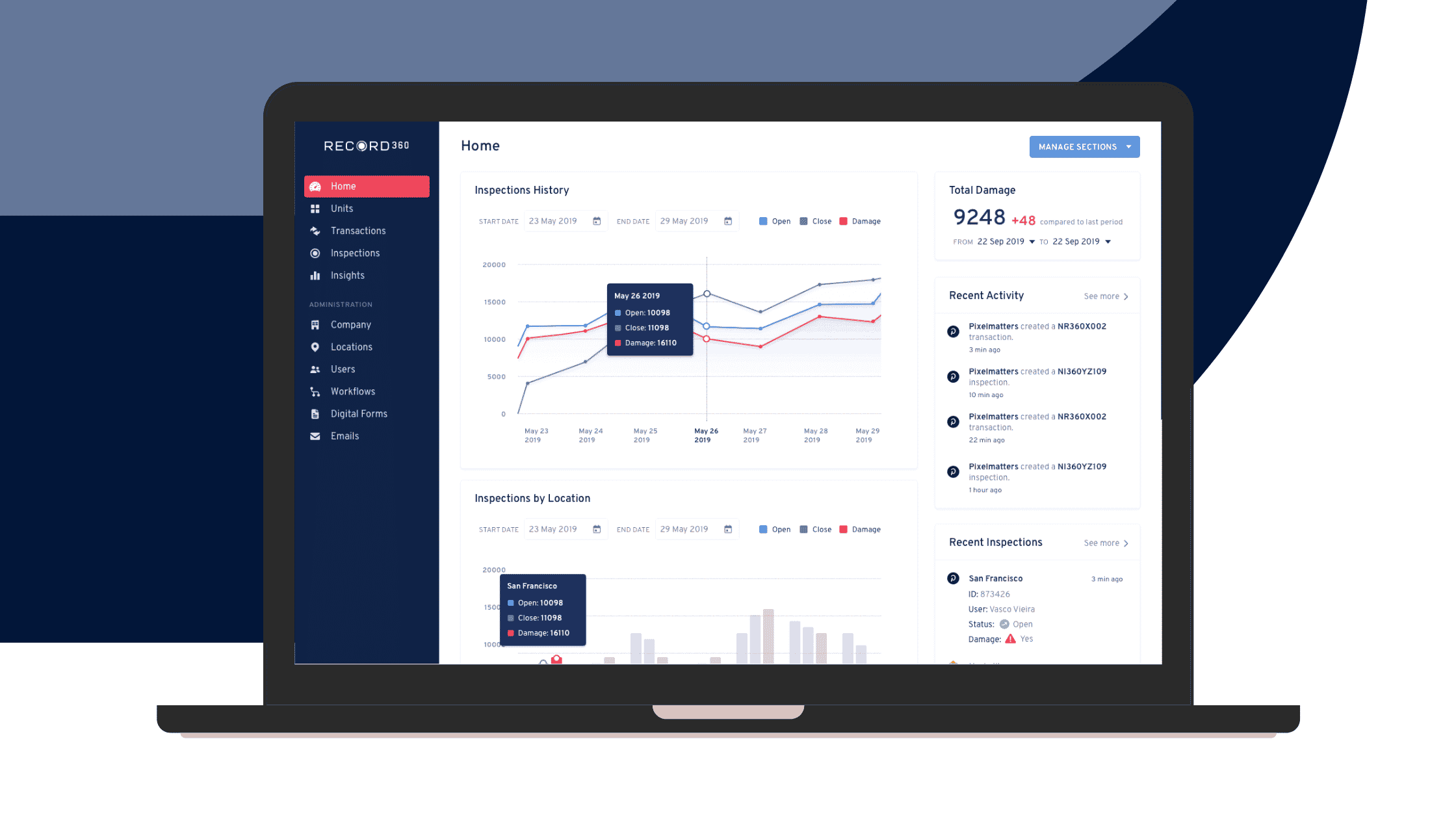
The Record360 dashboard shows an excellent top-level view of your inspections. You can see the number of ongoing and completed inspections and damages discovered within a given period.
Blog-Top-11-equipment-inspection-software-features-3

If you have multiple branches, Record360’s location-related features are beneficial for coordination with your staff and monitoring. For example, you can view your inspections by location and get live updates on recent equipment evaluations.

These pieces of real-time information appear in Record360:

  • The asset’s ID number;
  • Name of the employee who updated the inspection;
  • Whether or not damages were found;
  • Status of the equipment examination;
  • How long ago the updates occurred;
  • And more.

You can also see your asset’s last location on a map.

Blog-Top-11-equipment-inspection-software-features-6

All these actions and rich information enable your company to respond fast and keep your customers safe from accidents, injuries, and fatalities that can result from those defects.

3. Digital inspection tools protect customers against unfair accusations

Your technicians can perform more accurate and timely inspections electronically, compared to doing the inspections manually.

Not only that, documentation details are often more precise and up-to-date. They can also provide solid evidence for any dispute or accusation that can arise about damage or unlawful asset usage.

Manual inspection methods and records cannot track or pinpoint exactly who was at fault for the undesirable incidences. Is it your client, staff, a third party, or a natural circumstance?

Customers who receive unfair blame and charges for something they didn’t do can feel upset because they will feel you don’t trust them. Their budget will also be impacted negatively from the extra expense of covering for the damage. Both of these jeopardize your relationship.

That’s why digital inspection tools can better protect your clients’ feelings, sense of value and trustworthiness, and incomes compared with manual inspection methods.

For instance, an electronic sign-off and daily equipment inspection form can show the asset’s condition before and after being rented out. Customers can also electronically sign to validate the observation, especially for the pre-rental state.

On the other hand, suppose disagreements happen, and your digital inspections (through the photos and videos) reveal that your customers were proven liable for the damage. 

In that case, they can check and concur with the findings, acknowledge their responsibility, and compensate appropriately. This helps build their integrity, trust in your company, and a solid foundation for your lessor-customer relationship.

Pioneer Equipment Rental shares a noteworthy story of how they were able to preserve their customer relationships despite charging them for the discovered post-rental damages:

We have a customer that is doing quite a bit of demolition and basically started demolishing our excavator, the bucket starting to come apart. Cracks, damage on the body, things like that, and  we had clear pictures of that bucket before it went out with a new bucket versus how it came back.

And that was like probably a $4,000 claim in itself, and you know what, and it went smoothly. We still have a customer. He understands his people did the damage, and he’s responsible, and we still have a good customer relationship.

Michael Allan, president of Pioneer Equipment Company, even adds,

We don’t want to file insurance claims, so if we can settle damage issues with our customers in a diplomatic way, that is a good form of insurance itself.

Protect your customers with robust digital inspection tools

Maximize today’s digital inspection tools to protect your equipment and customers.

When you can effectively examine your equipment and guarantee its best working condition, you can better ensure your customers’ safety.

Need more help with exploring digital inspection tools? Schedule a demonstration today and we’ll show how Record360 can support your company’s inspections and other operations.
Commercial truck inspection mistakes you need to avoid

Your commercial truck inspection is crucial to the longevity of your vehicles.

Frequent, careful inspections safeguard your clients, fleet, and even your bottom line.

Sadly, because many truck rental businesses aren’t religious about their inspections, they miss out on the benefits of having well-maintained trucks.

Even small compromises in a truck inspection over time can lead to catastrophic repercussions, such as accidents, financial, and client losses, etc.

Prevent these from happening to your truck rental company. Learn the commercial truck inspection mistakes you should avoid and the right steps you should do instead.

1. Superficially checking truck parts

A truck inspection often becomes so habitual that technicians can perform it mindlessly. However, this results in careless assessments of vehicle parts’ conditions that don’t guarantee safe, optimal operation.

For example, testing the braking systems requires exhaustive scrutiny. It involves checking the slack adjuster with the brakes, hunching under the trailer or over the wheels, ensuring air lines are not leaking, etc.

If your technicians carry pens and clipboards, the steps become extra tedious, wearying technicians and tempting them to dismiss careful inspection.

To avoid that mistake, use a digital truck inspection form. For example, our Record360 app has an electronic inspection checklist customizable according to your operations.

It even lets you capture all needed inspection data in one standard format. This makes checklists and later reports look clean and easy to read.

Blog-Top-11-equipment-inspection-software-features-1

By loading inspection checklists onto mobile devices, technicians can painlessly carry them around while comprehensively examining your truck’s parts.

The result is a precise inspection, leading to optimally running vehicles, plus client safety.

2. Inaccurate documentation of truck conditions

Another truck inspection mistake to avoid is using inefficient methods to record your vehicle’s pre- and post-rental conditions — especially when defects are present.

Manual methods (e.g., narrative descriptions, hand-drawn illustrations) fail to capture the extent of any damage accurately, even for visible ones.

Once you discover any defect emerging or worsening and argue with your clients about it, you’re likely to lose the dispute.

After all, you don’t have solid evidence showing they caused it.

That is why, to avoid making this mistake, you must use photo and video documentation for your pre- and post-rental commercial truck inspections.

Our Record360 app demonstrates that with its high-resolution photo and video capture functionalities. It also lets you add tags indicating exactly the damage type and area in your truck.

Blog-Commercial-truck-inspection-mistakes-you-need-to-avoid (2)

Here’s another benefit to the Record360 app for recording inspections. You can create digital pre- and post-inspection forms and reports, attach photos and videos of your truck’s condition, and request clients to verify them with their digital signatures.

Copy-of-Blog-Winning-rental-businesses-are-transforming-their-business-with-inspection-management-software (1)

All this streamlines and bolsters your documentation workflow and enables you to resolve any arising customer disputes peacefully.

3. Failing to alert the team of recorded damages

It’s not enough to document your truck’s condition properly. You should also report the damages and notify your team promptly for corrective action.

When this happens, don’t put handwritten reports on tables and risk losing them or delaying the needed repairs.

Use more efficient methods such as instant email and SMS alerts.

The Record360 app offers those features when you discover truck defects and inspections fail. 

It schedules the automatic delivery of these messages, shortening the communication process from technicians to maintenance officers.

Blog-Commercial-truck-inspection-mistakes-you-need-to-avoid-1

Plus, remember the photos and videos with damage tags?

Our app lets you upload them to the cloud for your team’s ready access. This enables them to view the defects even remotely and determine and schedule the correct repairs fast.

There is no need to transfer media files via USB cords and email long threads, resulting in more working time consumed and communication disarray.

4. Segregated monitoring of inspection activities

Trucking companies with multiple branches usually struggle with efficiently monitoring inspection activities from other locations. This is typical, especially if they use manual systems.

If that’s your case, you make the mistake of segregating your inspection monitoring.

This leads to inaccurate overviews of your fleet’s real situation, low responsiveness to issues, etc. Eventually, these will hurt your business performance.

The solution? Harmonize your inspection activities from various locations with truck fleet management apps.

Record360 software can help you with streamlining and centralizing your inspections.

It has a user-friendly dashboard that reports your inspections by location, their history, total damages found, recent real-time activities (including vehicle checks), and more.

Blog-Top-11-equipment-inspection-software-features-3

Moreover, if you need specific inspection data from technicians in remote locations, you can send them a direct link to our Record360 app.

You can then get instant access to that dataset and respond immediately to damage or any other issue. This feature lets you perform truck inspections from any place.

5. Inefficient truck inspection implementation

Conventional inspection systems are often inefficient, whether using hand-drawn and narrative condition descriptions, relaying printed damage reports on office tables and bulletins, or others.

All this internal inefficiency in your truck inspection workflows could result in fewer rentals deployed, delayed service delivery, lagging rental and inspection schedules, etc.

Streamline your inspection workflow management by digitizing related processes, forms, and assignments for your team. Our Record360 truck inspection app can help with that.

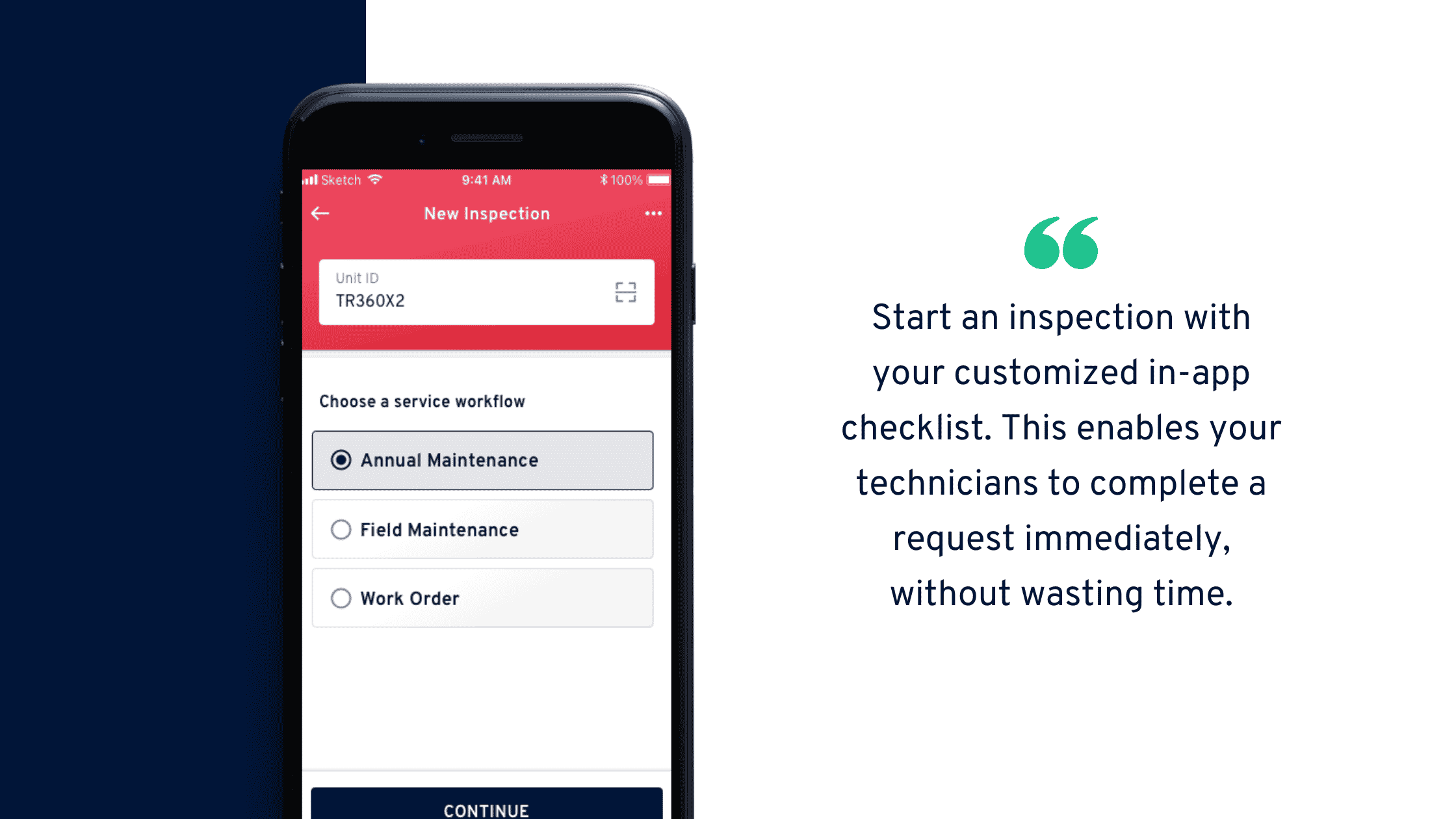
For one, it allows you to start an inspection with your customized in-app checklist, then send it to your team. This enables technicians to complete a request immediately in the field, saving plenty of working time.

Record360 also makes it quicker for you and your team to begin inspections and document your vehicle’s condition. 

Under the “New Inspection” functionality, Record360 displays various task choices. Clicking on any one of them leads you to the right forms, checklists, etc., suited to the type of inspection you need to perform. This simplifies and accelerates your team’s work.

Blog-Commercial-truck-inspection-mistakes-you-need-to-avoid-2 (1)

When you can perform and finish inspections fast and correctly, you boost your internal productivity, service delivery, and customer experience.

6. Disregard a roadway safety mindset

The ultimate reason you conduct truck inspections is to promote roadway safety, which involves your clients’ lives, vehicles, and even national properties, among others.

Which is why you should always keep that in mind when inspecting your fleet. The goal of guaranteeing safety motivates you to examine trucks extensively — even beyond what’s in the checklist, routine, or other minimum requirements. 

Inculcate this roadway safety mindset and culture among your team, so they can also give their best during truck inspections. 

Stop committing these commercial truck inspection mistakes.

As a truck rental company, you c-a-n-n-o-t afford to compromise on your vehicle inspections.

Doing so endangers your clients, fleet assets, and eventually, your business.

Avoid making these and other truck inspection mistakes — and you’ll reap the benefits of managing a safety-first rental business.

Interested in learning more about Record360? Schedule a demonstration today.

The importance of electronic signatures for equipment inspections

Using electronic signatures streamlines your equipment inspections, asset management, and rental operations.

With it, you can obtain the signatures of parties involved in your processes and transactions without having to meet them physically.

Offering e-sign options for your customers can drastically improve and simplify your processes while making doing business with your company more efficient and flexible.

This article covers what an electronic signature is, its impact on your equipment rental company, and why it is crucial for modern inspections.

Definition of an electronic signature

An electronic signature (or e-signature) is a legal method of getting approval or consent on digital forms and documents. Legal e-signatures can replace handwritten ones in any virtual process. 

The current U.S. code under the Electronic Signatures in Global and National Commerce (E-SIGN) Act defines e-signatures as:

An electronic sound, symbol or process that is attached to or logically associated with a record and executed or adopted by a person with the intent to sign the record.

Are e-signatures legally binding?

In the U.S., electronic signatures are recognized and legalized as equally binding as pen and paper signatures after legislation passed the Uniform Electronic Transactions Act (UETA) and the E-SIGN Act in 1999 and 2000.

The two pieces of legislation allow e-signatures to replace ink signatures as long as they meet three legal hallmarks: 

  • The signer must be whom he/she claims to be. The signer’s identity can be authenticated or verified through digital markers, such as an IP address (if required). 
  • The signer’s intent to affix his/her signature to the document or form is captured. The e-signature is legally binding if the transaction’s parameters have been communicated and the signer unequivocally goes through the signing process. 
  • The signature associated with the form or document is verifiable. The electronic signature is legally accepted if the steps in the signing process can be validated. This includes how the document was signed, what action the signer completed, and what documentation was presented to support the digital transaction. The business or originator must also keep a record of all electronically signed documents. 

That said, e-signatures are legally binding as conventionally obtained signatures as long as they satisfy the legal requirements.

How to insert electronic signatures

How companies implement and set up electronic signatures depends on the type of business and transaction involved in the signing process. 

E-signature deployment methods and the customer-facing interface can also be unique to the company based on the software or applications.

Most e-signature tools allow you to upload your document and enter the signer’s email address. The signer can then click the link within the email and sign digitally from a mobile device, browser, or computer without signing up to or downloading anything. 

Equipment inspection software Record360 is equipped with a helpful eSign feature that lets inspectors affix an electronic signature after filling out a new equipment inspection form.

Copy-of-Blog-Winning-rental-businesses-are-transforming-their-business-with-inspection-management-software (1)

If you have a previous inspection record that needs signing off, you can open it from the app and send the report to your customer’s or other stakeholder’s email address.   

With the in-app e-Sign equipment inspection software feature, you can easily replace your paper forms and processes.

You can capture digital signatures easily and on the fly, minimizing the waiting times involved in the traditional methods of securing signatures. 

Record360 also allows you to set up auto-emails to send out inspection records efficiently to your customers, then store them in the app’s secure dashboard for easy document tracking and access.  

Importance of electronic signatures during equipment inspections

Manually getting people’s signatures on your inspection records can be a long and painful process. This can lead to equipment inspection delays, can keep your operations from running smoothly, and in turn, you lose money. 

Electronic signatures can address these issues while providing the following benefits. 

1. Efficient inspections

The paperwork that comes with securing signatures for your inspection records can be time and labor-intensive. 

It takes away precious time you could spend on core tasks that help you achieve your business goals. 

Electronic signatures can help optimize your equipment inspection process, eliminating the manual and repetitive aspects through seamless digital methods. 

With e-signatures, you and your staff won’t waste time on:

  • Waiting for senior managers to return to the office to get their signature
  • Signing (or obtaining signatures), printing, scanning, and manually posting inspection records and other related documents
  • Manually archiving authorized records
  • Manually verifying if the documents were signed by the right or authorized people

You can accelerate your rental processes, equipment inventory management, asset inspections, and entire business operations because e-signatures allow you to:

  • Save time on creating inspections and getting them signed
  • Secure signatures from everyone (customers and managers) anytime and anywhere through any device
  • Make the whole approval process less prone to error and streamline it
  • Get the same level of trust and security with documents signed with wet ink
  • Move your workflows along more efficiently, leading to seamless operations and increased revenue

2. Improved customer experience

Electronic signatures improve your customer’s experience with the company because it provides a convenient way for them to sign your equipment inspection reports. 

This also means holding parties responsible for any equipment damages is more streamlined, and you’ll have clear, irrefutable proof to back up your claim. 

Your staff can take high-resolution equipment videos and photos using the Record 360 app to capture equipment damages, attach them to the inspection, and send them to customers to sign and acknowledge.

Blog-Top-11-equipment-inspection-software-features

Auto-emailing your inspection reports and obtaining signatures digitally efficiently improves the process and reduces potential damage disputes and frictions with customers. This can enhance your interactions and relationships with customers, encouraging repeat business and client loyalty.  

3. Obtain signatures securely

Electronic signatures include encryption to ensure the document can’t be changed after affixing a signature, preventing tampering risks. 

Digital signatures can also reduce errors on your equipment inspection reports because now you can do everything electronically and correct or update information easily without starting over. 

A reliable equipment inspection software helps ensure you have accurate and secure records and an efficient asset inspection, inventory management, and rental process.

Start using electronic signatures for equipment inspections

Electronic signatures eliminate cumbersome, tedious paperwork and methods, streamlining your equipment inspection process.

With electronic signatures, your staff can do their jobs more effectively and efficiently, allowing them to focus their time and energy on critical and revenue-generating tasks. 

Are you ready to leverage the power of equipment inspection software with robust e-Sign features? 

Schedule a demonstration today to learn how Record360 can optimize your equipment rental processes.

10 equipment inventory management tips for better inspections

You need an efficient equipment inventory management system to run a streamlined and high-performing equipment rental company.

Without one, you’ll have a long-winded process for checking an equipment’s availability, renting it out, and creating client contracts, among other things.

To improve the quality of your rental company’s asset inspections, you need more than just a handy equipment inspection form. You need reliable equipment inspection software plus efficient equipment inventory management to organize your assets and monitor their availability and usage.

In this article, we’ll share tried and tested tips to improve your inventory management and equipment inspections.

1. Apply an efficient tagging system for rental inventory

Put unique tags on your assets to hasten your search and identification when you need them — e.g., during registration in your equipment inventory spreadsheet or future handling.

Serial numbers are frequent tags, but opt for more recognizable asset ID numbers and codes. Be intentional about the coding for simpler memorability. 

Apply damage tags as well to streamline your identification and documentation of asset defects.

For example, the Record360 app lets you place and customize appropriate tags onto your equipment photos and videos for faster reference to your company and clients:

Blog-Top-11-equipment-inspection-software-features


2. Leverage RFID tags, barcodes, or QR codes

Using barcodes, RFID tags, or QR codes is also straightforward and efficient for equipment inventory management and identification.

By scanning these codes during check in and out, you save time and effort and reduce human error in identifying your assets.

You can also opt for QR codes because they can provide further information from your equipment inventory system and lead you to relevant app pages and functions.

3. Digitize your equipment management forms and processes

Speed up your equipment management processes by replacing paper-based tasks, forms, and equipment inventory lists with digital ones.

For example, from the Record360 app, you can create electronic rental inventory checklists and inspection forms and load them straight onto your mobile device.

This helps your team capture essential standard information for input in the equipment inventory system, check your assets’ conditions, schedule repairs, and deploy it to your clients faster.

With these and other benefits of digitization for your company, you can agree that going paperless is a journey worth taking indeed.

4. Use robust equipment management software

To centralize your asset inventory management and its tasks, information, media, and inspections, use an equipment management software tool.

These tools streamline your operations more efficiently than equipment inventory spreadsheets, help you track your asset usage more closely, and minimize human error.

For one, Record360 has a comprehensive dashboard with data, insights, and visuals about your fleet’s real-time conditions, location, and others.

From this app, you can also verify client identities, assign inspections, get customers’ digital signatures, keep your team in the loop, and many more.

5. Simplify incident reporting for rental inventory

Upgrade recording asset defects in equipment inventory lists using electronic and other efficient systems to report them and notify your team fast.

Give your team quick access to visual documentation, automatic damage labels, and even geo-tags and time-stamp features, such as those on Record360.

Cloverdale Equipment Co. rental manager Sean Carr shares how these features helped them report asset damages and resolve any related disputes:

Because the record includes the time, date, and location of the drop-off, no one can dispute the condition the equipment arrived in…We record the same information so everyone knows the condition of the equipment exactly when we picked it up.

6. Set up real-time relevant notifications

Update your team fast by setting up real-time notifications for asset damages, inspection failure, and other critical equipment inventory management matters.

Use SMS, push, email, and other instant communication channels. For instance, the Record360 app lets you schedule automatic email delivery to concerned departments in your company.

Through these alerts, you maintain your team’s productivity, open active communication lines, and hasten your response time.

7. Streamline equipment assignments and handoffs

Delegate and hand off tasks easily to your team through electronic inspection checklists and forms, such as the ones on Record360’s app.

With this feature, you can kick off asset inspections from mobile devices, quickly and thoroughly check your equipment inventory system, and help your team finish their assignment on the field.

8. Manage your equipment and inspection locations

Streamline your multi-site asset inventory checks and inspections through an equipment management system that lets you perform those tasks from anywhere.

For example, Record360 lets you send to your team direct links to digital inspection forms and checklists in the app. You can then immediately obtain remote data in real-time and act accordingly to the reports.

Bobcat of St. Louis corporate rental manager Mike Rust relays how using Record360 helped him do that:

With Record360, it’s much easier to do equipment reviews across locations… All the rental manager needs to do is call up the original rental record, take a new batch of photos, and see if there’s any new damage.

This results in a more rapid turnaround for them and their clients.

9. Implement simple, secure documentation

Beyond equipment inventory spreadsheets, document your assets’ actual condition through high-resolution photos and videos you can upload to the cloud and share with your team.

With these media, you can precisely capture any equipment defects, instantly inform your team and clients, and provide solid evidence on your innocence about the cause of damage.

The Record360 equipment management software has simple-to-do high-res camera functions, damage tags, and cloud-secure storage and sharing systems.

These simplify and enhance your documentation and inspection far better than incomplete manual, handwritten reports, and equipment inventory lists — and are among the several ways rental software protects your assets.

10. Schedule periodic rental inventory audits

Regularly audit your assets for your accounting and tax duties and equipment inventory spreadsheet updates instead of doing it entirely at the end of the year. 

By dividing a whole year’s workload into more doable chunks, you lessen your stress and get more time to verify information and correct any errors.

Schedule your internal audits every week, month, or quarter — whichever is suitable for your company. However, high-value assets must undergo more frequent inspections.

Additionally, keep tabs on looming tax changes and prepare for them ahead of time. Then, apply the adjustments to your regular inventory audits for a gradual, less burdensome implementation.

FAQs on Asset Inventory Management

Following are some FAQs on asset inventory management and their corresponding answers:

What is an equipment management system?

An equipment management system is a software tool to help monitor asset conditions, generate accurate reports and information, and provide other functionalities to simplify related tasks.

How do you track equipment usage?

Track equipment usage through asset identification and geo-tags, time-stamps, an equipment inventory system, high-resolution before-and-after photos and videos, user logs, barcodes and QR codes, equipment inventory lists, and others.

How do you manage equipment inventory?

Manage equipment inventory efficiently through equipment management software, which logs asset users, location and date-and-time information, photos and videos, and more.

Improve your equipment inventory management process

Optimize your company’s equipment inventory management through hyper-efficient practices and robust but simple electronic and software tools. 

Show your team how these adjustments streamline your asset inventory management to encourage them to adopt the tools and best practices.

Interested in learning more about Record360? Schedule a demonstration today.

Why equipment videos and photos are important for equipment inspections

Can your equipment inspection software capture photos and record videos of your equipment during inspections?

Can it also make them immediately available for review on a web portal?

If you answered “no,” then you are likely dealing with one or more of these challenges:

  • You manage multiple damage disputes
  • You are eating the cost for many of those disputes
  • You are spending thousands of dollars on equipment repairs when you aren’t at fault

Here’s the thing: Equipment videos and photos are an absolute must for equipment rental companies.

They show your assets’ true condition during inspections.

These images and videos remove any vagueness in your equipment descriptions, which is absolutely crucial to avoid damage disputes (or winning them).

That is why if your equipment inspection software is not equipped with video and photo-documenting features, your rental company would lose big time.

This guide will cover the crucial role equipment videos and photos play and the importance of having equipment inspection software for rental companies.

Why do you need equipment inspections, and when is the best time to do them?

Conducting a thorough heavy equipment inspection and preventative maintenance is crucial to ensure your fleet remains compliant with operations and safety regulations.

It could save you tons of money because a regular heavy equipment inspection could help you detect machinery issues before they escalate into bigger problems.

This means you can focus your resources on maintaining your equipment instead of replacing them. It also ensures your equipment is safe for use and helps you avoid costly liabilities when accidents occur.

Below are some points your equipment inspection form should include:

  • Tire pressure
  • Mirrors and glass
  • Brakes and lights
  • Fluid levels
  • Horn
  • Seatbelts
  • Tire condition
  • Steering
  • Fuel and oil leaks
  • Safety devices (fire extinguishers)
  • Emergency stopping system 

Perform regular equipment inspections before and after releasing your rental assets. This improves your equipment inventory management and ensures your assets are in excellent condition while they are rented out, preventing them from malfunctioning on-site, and protecting their readiness for the next job.

A heavy equipment inspection should be conducted when:

  • Your assets have been exposed to conditions that can cause damages and compromise safe operations
  • Your equipment has experienced severe environmental conditions, such as being in muddy, dusty, wet, or corrosive areas
  • Your assets were driven on mountainous terrains and unpaved roads
  • Several operators handled your equipment
  • The machinery is to be used for tough jobs
  • The asset shows signs of necessary repairs indicated by noises, signals, and obvious damages
  • You are about to sell or buy a piece of used equipment
  • The worksite location is far from your shop

Use an equipment inspection checklist template to simplify your routine asset inspections.

Why equipment videos and photos are crucial during inspections

Equipment videos and photos provide visual and physical asset documentation and proof of damages that written records alone can’t capture.

Below are some of the reasons why equipment videos and photos are critical when conducting a heavy equipment inspection.

1. Capture, document, and protect your assets

Instead of painting a picture of your machinery’s real state via narrative descriptions, you get an actual image of its true condition through videos and photos.

You can easily capture, store, and share your inspection findings using these videos and images.

Record360 is an equipment inspection software that lets you take photos and videos of your assets using your smart devices via its mobile app. 

The Record360 app eliminates paper-based inspections and comes with a customizable equipment inspection checklist template.

You can upload media or take new equipment videos and photos to document asset damages and defects and attach them to your inspection report.

Add an electronic signature and the receiver’s email address and send — that’s the entire inspection process done in minutes. 

Record360 provides a quick and easy way to record and file your equipment videos and photos during inspections.

According to Cloverdale Equipment Co Rental Manager Sean Carr:

Record360 is the hard evidence we were missing to prove equipment condition.

2. Protect your equipment 

Keeping track of your equipment’s condition with paper documentation or a “big board” is challenging if you have a large fleet, especially if you release over 10 pieces of machinery daily. President and co-owner of Pioneer Equipment, Michel Allen, said,

Before Record360, we were using the Fred Flintstone method, which was writing everything down and trying to keep up with data on a marker board.

Video and photo documentation drastically speeds up your ability to check your equipment while also improving the quality of your inspections and records.

Record360 allows your team to easily capture high-resolution videos and photos, including relevant documents they can upload and attach to reports.

This simplifies gaining irrefutable proof of equipment damages from customer use. You would be able to hold responsible parties liable for these damages, and you won’t lose thousands of dollars on disputes.

Record360 also lets you save asset condition and heavy equipment inspection records in a centralized location that you, the managers, and your team can easily access, search, and share. 

Beyond video and photo documentation, the app also offers condition recording and monitoring that is vital to protect your assets. 

3. Streamline equipment inspections

Writing long reports to describe your assets’ condition can take too much time and effort. 

This can also slow down rental processes and could increase the risks of critical and often costly asset defects and damages. 

However, by recording the inspection through videos and photos, you can streamline the process without the need to describe the asset’s condition and incurred damages word by word.

Record360 expedites this process through its digital capabilities using your mobile device. It also lets you add tags and information directly to the photo or video to show which parts and areas have damages and other issues.

Easily share the captured media by uploading it to the Record360 web app or including it in your equipment inspection reports. 

Fleet managers can easily access the files and records through the web app anytime, anywhere, and they can download and share the files when needed. 

The app also speeds up your internal handoffs by allowing you to access inspections from your desktop and alert your team in the field.

Record360 equipment inspection software provides you with geo-tagged and time-stamped records, resulting in better customer relationships, fewer disputes over damage, and meaningful savings for your business.

As Newman Tractor Rental Coordinator Xavier Vela had said,

Using Record 360’s streamlined documentation process has halved the amount of time spent on equipment reviews while protecting the company from $7,500 in damage expenses a month.

Takeaways from the importance of equipment inspection videos and photos

A systematic regular asset inspection process with proper documentation ensures you have everything you need to capture your equipment’s condition before, during, and after a rental. This would protect your assets and streamline your equipment inspections. 

Capturing videos and photos of the equipment will help you comply with safety and operations regulations at all times and improve your preventative maintenance processes. 

It can also reduce potential negative impacts on your productivity, guard your company against liability risks, and decrease costly damage disputes and expenses.

All of these and more through one equipment inspection software. Discover the power of Record360 and schedule a demonstration today.