
See Record360 at Bauma 2025: April 7-13, Munich, Booth C4-719

Archives for October 2023

The Power of a Checklist: A Deep Dive into the Impact of Heavy Equipment Inspection Sheets

Imagine you’re a project manager, Alice, overseeing a primary construction job. The machinery, gigantic and complex, is the lifeline of your project. One day, an excavator unexpectedly breaks down. Work halts, deadlines are pushed, and your headache burgeons. But could this have been avoided? Enter the hero of our story: Heavy Equipment Inspection Sheets.

Why These Sheets Are Not Just Papers but Shields

At first glance, they might look like mere checklists. But think of inspection sheets as your machinery’s health report and safety net. Ensuring every cable, bolt, and valve is checked, they safeguard against unexpected hiccups, guaranteeing the machines’ longevity and the crew’s safety. In Alice’s scenario, regular use of an inspection sheet might have spotlighted an issue with the excavator before it became a costly problem.

Read More: 5 benefits of using a digital equipment inspection form

The Invisible Benefits: Looking Beyond the Immediate

When you’re actively preventing mishaps through meticulous inspections, you’re not only safeguarding the project’s flow but also:

  • Stretching the Dollar: Early detection of issues = less unexpected spending on emergency repairs or replacements.
  • Clocking More Hours: Ensuring machines are in peak condition maximizes operational time, keeping you right on schedule.
  • Upholding Your Reputation: Consistently smooth operations mean happy clients and a stellar reputation in the industry.

These sheets are more than just paper; they’re a crucial asset, safeguarding projects from unforeseen setbacks.
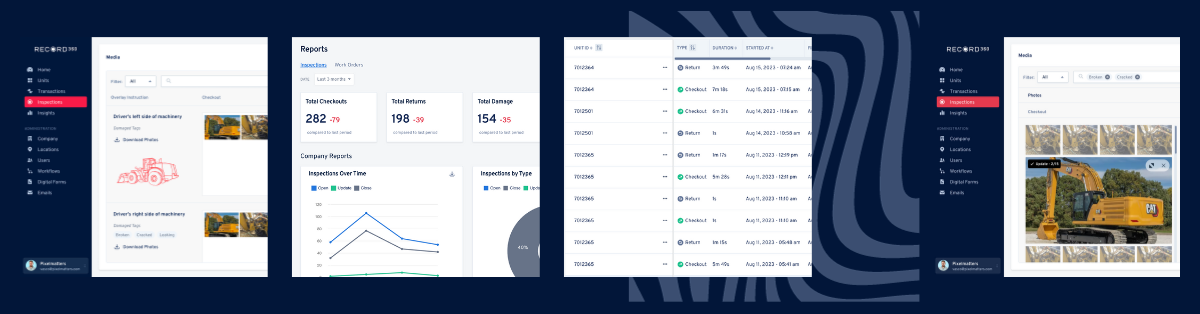
Record360: Ushering in the Future of Machinery Inspections

Let’s talk tech! Record360 transforms these humble sheets into a powerful digital tool, propelling your machinery care into the modern age.

  • Digital Brilliance: Imagine having the ability to attach high-resolution photos or videos to your inspection records instantly. Visible proof, right there on the sheet!
  • Safety Net in the Cloud: With all data stored securely, you never have to worry about losing a critical record or note.
  • Access Anywhere, Anytime: Need to check a record while in the field? Easy! It’s all there, accessible with just a few taps on your device.

In essence, Record360 isn’t just enhancing inspection sheet management; it’s redefining it, making the process more secure, efficient, and user-friendly. Alice, with Record360, would have had tangible proof of regular machinery checks, potentially circumventing that untimely breakdown.

Must Read: Streamlining Efficiency: Inspections with Record360

Putting It Into Practice: Making Inspection Sheets Work for You

So, you’ve got the sheets and the tech, but the magic happens when they’re interwoven into your routine.

  • Consistency is King: Make them a non-negotiable part of your machinery use.
  • Education for All: Ensure every team member knows why they’re important and how to use them properly.
  • Embrace the Tech: Leverage digital tools like Record360 to elevate the efficiency and efficacy of your inspections.

Elevate Your Operations with Smart Inspections

Heavy Equipment Inspection Sheets might be underappreciated, but as Alice’s story tells us, they’re undeniably pivotal. They safeguard machinery, projects, reputation, and the bottom line. Infuse them into your operations and witness your projects’ seamless, uninterrupted flow.

Want to bring your machinery inspections into the 21st century with Record360? Let’s chat! Request a demo, and let’s ensure that machinery mishaps become a tale of the past.


Elevate Your User Experience: Exciting Product Updates for September

In today’s fast-paced digital world, where user experience reigns supreme, we are thrilled to share two significant product updates that will transform the way you interact with our mobile app. At Record360, we are constantly striving to enhance our offerings, making them more user-friendly, visually appealing, and efficient. So, without further ado, let’s dive into these exciting September updates.

Redesigned Photo Instructions

A Makeover for Enhanced User Experience

The first major update on our list is the complete makeover of our mobile app’s camera instructions. We’ve taken your feedback to heart and revamped the design to ensure a seamless and enjoyable user experience. Here are the benefits of this update:

  • Updated Design: We’ve given the instructions a fresh, modern look, making them more intuitive and visually appealing. No more struggling to navigate through confusing instructions!
  • Progress Bar: Keeping track of your progress is now a breeze. With the newly added progress bar, you’ll always know how many instructions you have left to complete.
  • Strikethrough Behavior: Ever wondered which instructions you’ve already captured photos for? Wonder no more! Our intuitive strikethrough feature will make it crystal clear.
  • Collapsible/Expandable Instructions: We understand that flexibility is key. You can now collapse or expand instructions, allowing you to pick up where you left off without any hassle.
  • Instruction Labels: For added clarity, we’ve included instruction labels on photos within the media detail screen. This feature enhances your ability to reference your images and instructions conveniently.

More Control, More Clarity

The previous instructions had their quirks, but we’ve addressed those issues comprehensively. Previously, users had to follow instructions before capturing additional photos, which often disrupted the flow. Moreover, readability under certain lighting conditions was a challenge. With our new design, you have the freedom to switch seamlessly between instructions and capturing additional photos according to your preference.

Before & After Photos Instruction Mode

Streamline Your Workflow for Efficiency

Our second exciting update introduces the “Before & After Photos Instruction View.” We’ve reimagined the way you manage inspection photos, making your workflow more organized and efficient. Here are the features of this update:

  • Group Inspection Photos: Say goodbye to the days of jumbled photos and disorganized inspections. Now, you can group inspection photos based on instructions directly on the dashboard, ensuring a smooth and organized process.
  • Comparison Mode: Dive deeper into your inspections with our comparison mode. This feature allows you to view photos by section between check-out and return, enabling better analysis and decision-making.

In the past, there was a disconnect between photos and their associated instructions. This update bridges that gap, ensuring a genuine before-and-after comparison and simplifying the process of achieving complete photo and inspection compliance.

Conclusion

At Record360, we’re committed to providing you with the best user experience possible. These two exciting product updates for September mark a significant step toward that goal. We believe these enhancements will greatly improve your experience with our product, making it more user-friendly and feature-rich than ever before.

If you have any questions or suggestions, please don’t hesitate to reach out to our support team. We value your feedback and are here to assist you every step of the way.

Record360 can make your life much easier. Plus, you can record videos and take images of damage to protect yourself and keep customers happy. Request a demo today!