See Record360 at Bauma 2025: April 7-13, Munich, Booth C4-719

Now Live on the Decisiv Marketplace

Your Decisiv Cases Deserve Better Inspections.

Record360 is a mobile-first inspection platform integrated with Decisiv. Structured walkarounds, photos, and video attach automatically to every Case. No manual steps. No missing information.


Interactive Demo
Case Operations
Click to explore
Supports OEM dealer networks including
The Gap

Decisiv Runs the Case. Record360 Closes the Inspection Gap.

The Problem Without Record360
Intake documentation is manual and inconsistent
Service teams rely on web-based tools, basic attachments, or manual follow-up, creating gaps before the Case is complete.
Photos and videos do not reliably flow into the Case
Media can remain outside the service record unless someone captures and uploads it correctly.
Cases open without full condition context
Decisiv works once the Case exists, but it was not built to capture everything at the point of intake.
Triage slows when inspection details are missing
Missing photos, videos, meter readings, or condition details delay decisions and weaken the service record.
Disputes are harder to resolve without visual proof
Incomplete intake records create risk in approved service, damage claims, OEM compliance, and disagreements over asset condition.
The Solution With Record360
Structured mobile inspections completed fast in the field
Technicians capture photos, video, meter readings, signatures, and condition details from a mobile-first inspection workflow.
Photos and PDF inspection summaries auto-attach to the Case
When the inspection is complete, Record360 loads the photos and PDF inspection summary into the Decisiv Case attachments.
Video links post directly to Case Notes
Inspection videos are added to the Notes section, keeping visual evidence connected to the service record.
Every Case starts with stronger inspection context
Record360 can create or update Decisiv Cases and sync inspection data, PDFs, photos, signatures, meter readings, and video links.
Faster triage, cleaner compliance, fewer disputes
Fewer disputed claims, faster triage, and an accurate service record.
What You Get

Four Capabilities Built for Heavy Fleet Service

01

Mobile-First Intake Inspections

Guided walkarounds on iOS or Android. Photos, video, meter readings, and condition data captured in structured sequence. Works fully offline and syncs automatically when connected.
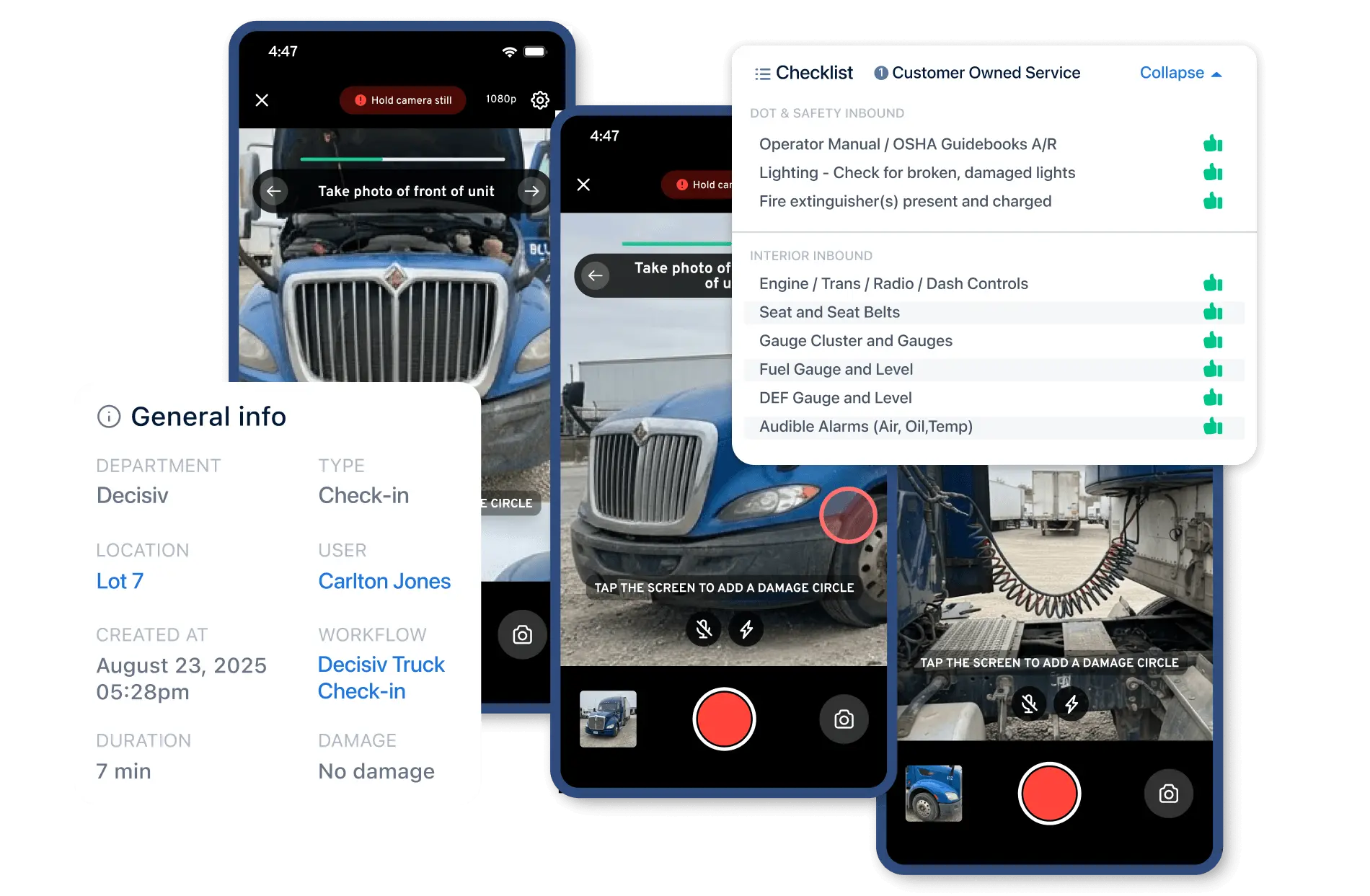
  • Guided checklist workflows with required steps
  • Photo and video capture with in-app markup
  • Works offline on any iOS or Android device
  • Custom checklists for DOT, MPI, QC, and intake
Record360 mobile inspection on tablet
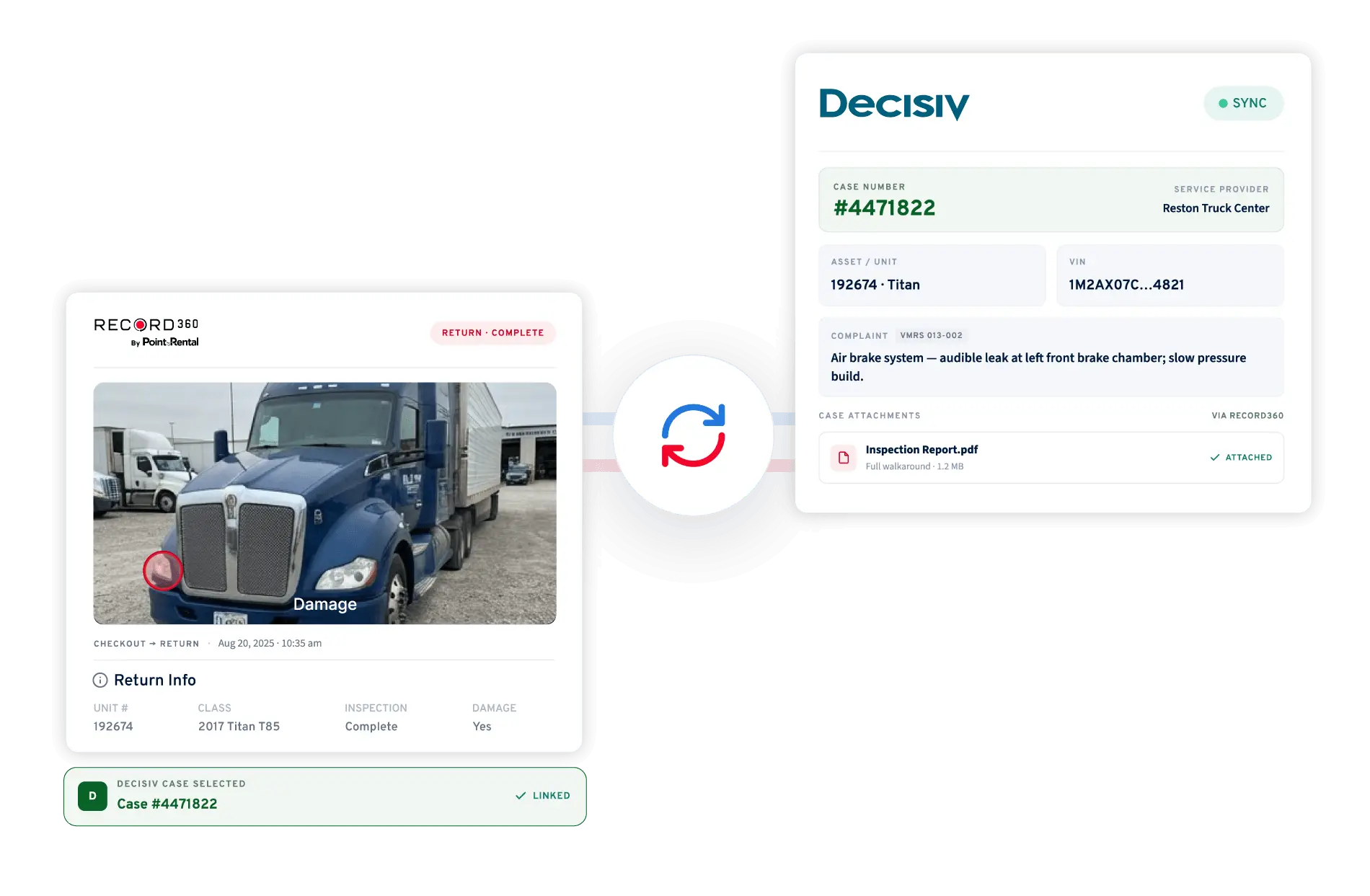
Record360 inspection attached inside Decisiv Case
02

Auto-Sync to Decisiv Cases

Select or create a Decisiv Case from within the Record360 inspection flow. PDFs and photos attach as Case attachments. Videos link in Case notes. No manual uploads. No missing files.

  • Create or select Cases directly in Record360
  • PDFs and photos attach to Case automatically
  • Videos hosted by Record360, linked in notes
  • Decisiv stays the single system of record
03

OEM-Compliant Documentation

DOT-ready, geo-tagged, timestamped records support PACCAR, Daimler, and Volvo workflows. Full lifecycle tracking from check-in through MPI, QC, and check-out, all tied to one Case.
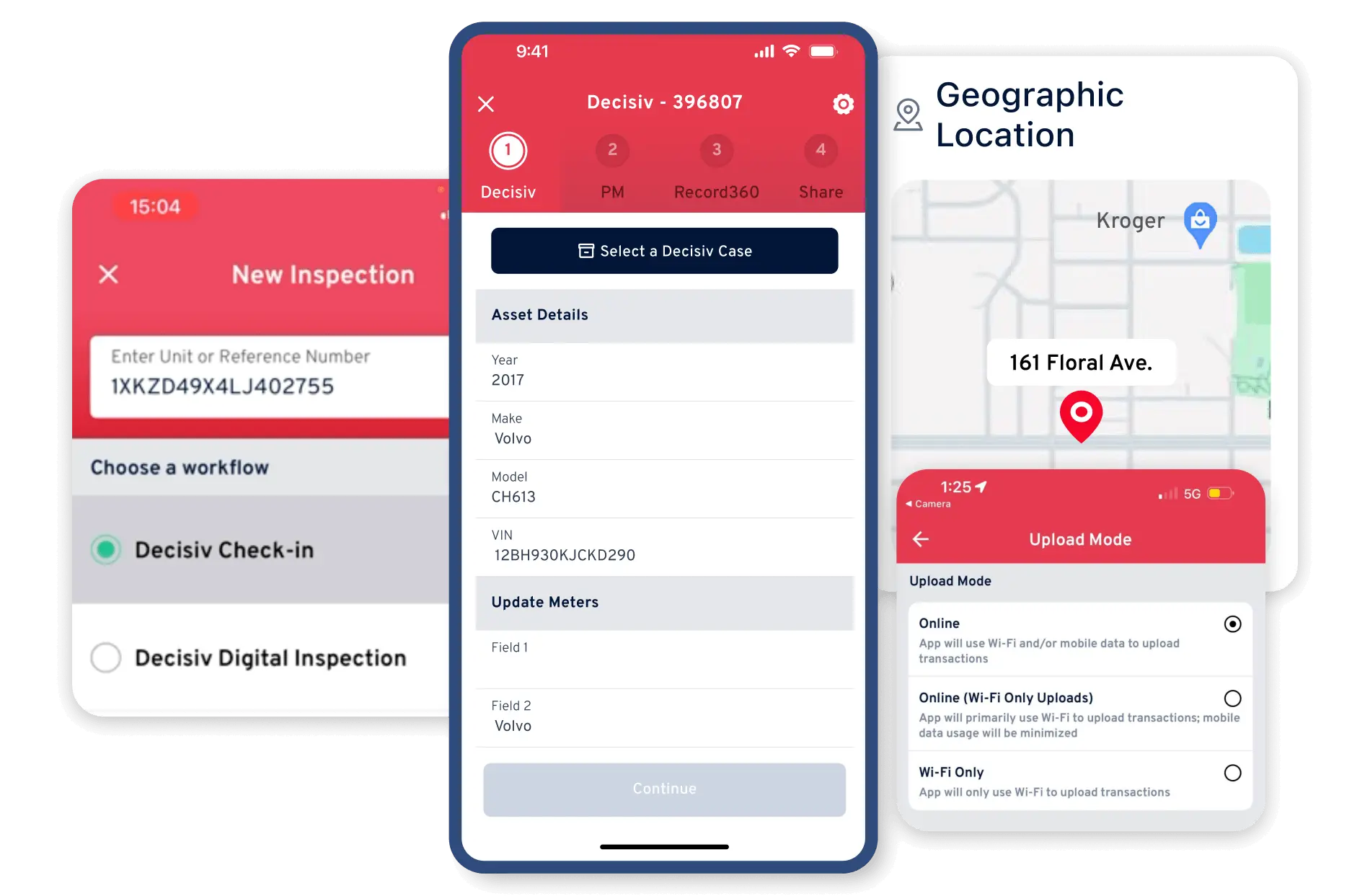
  • Supports PACCAR, Daimler, and Volvo requirements
  • Geo-tagged and timestamped inspection records
  • DOT pre-trip and post-trip checklist support
  • Audit-ready PDF reports generated automatically
OEM compliance documentation
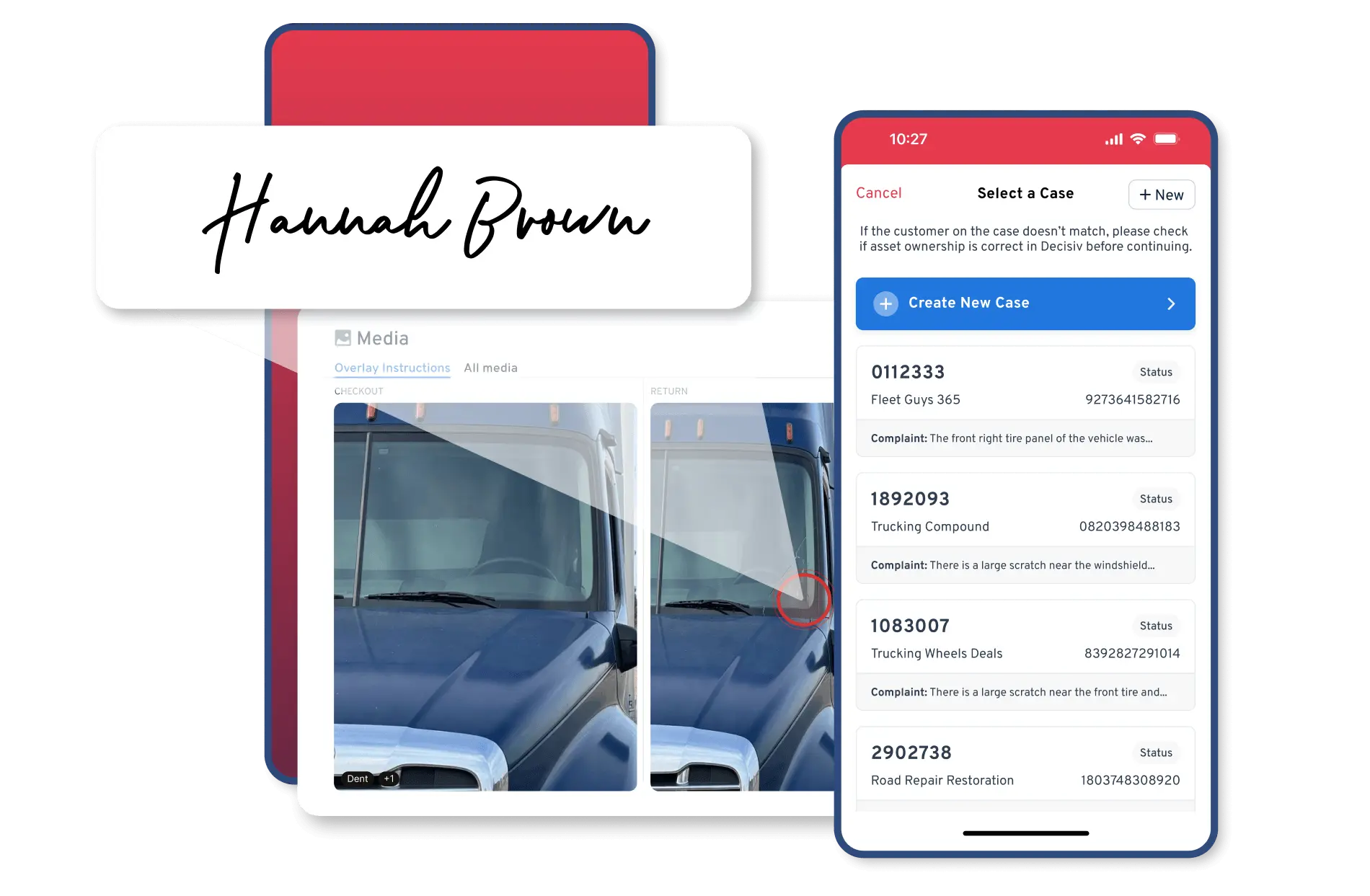
Record360 full service lifecycle workflow
04

Full Service Lifecycle Tracking

Check-in, MPI, QC, and check-out all tied to the same Decisiv Case. Before-and-after comparison at checkout with optional digital sign-off for clear accountability and dispute protection.

  • Every inspection type tied to one Case
  • Side-by-side check-in vs. check-out comparison
  • Optional digital sign-off at checkout
  • Faster approvals with complete visual context
How It Works

Three Steps to a Complete Case

Record360 fits directly into your Decisiv workflow. No complicated setup, no operational disruption.

1

Start a Guided Inspection on Mobile

A service advisor or technician opens Record360 and begins a check-in, MPI, QC, or check-out inspection using structured checklists and media capture on iOS or Android.

2

Link to the Decisiv Case

From within the Record360 inspection flow, select an existing Decisiv Case or create a new one. Decisiv becomes the shared system of record for the full service event.

3

Documentation Attaches Automatically

Photos, video, and the inspection PDF attach directly to the Decisiv Case the moment the inspection is complete. No manual uploads. Every service event starts and closes complete.

Decisiv manages the service. Record360 proves condition.

"

Decisiv customers depend on accurate, complete data to drive service decisions. This integration strengthens our platform from the very first moment of the service process, ensuring every case starts with a complete, verifiable record of asset condition.

JC
Jeff Clark, Chief Product Officer
Decisiv
Common Questions

Frequently Asked Questions

Does Record360 replace Decisiv? +
No. Record360 and Decisiv are complementary. Decisiv manages the full service workflow: case creation, approvals, communication, and billing. Record360 adds the inspection and documentation layer that Decisiv currently lacks. Every inspection done in Record360 flows directly into the Decisiv Case, so Decisiv remains your system of record.
How does an inspection get attached to a Decisiv Case? +
During the inspection in Record360, you select or create a Decisiv Case directly from the mobile app. When the inspection is completed, Record360 automatically attaches the PDF report and photos to the Case attachments section. Video evidence is linked in the Case notes and hosted by Record360. Nothing needs to be manually uploaded.
Which OEMs and dealer networks are supported? +
Record360 supports dealer networks operating on Decisiv, including Kenworth, Peterbilt, Freightliner, Volvo, Mack, Western Star, Isuzu, Hino, and Tico. Inspection checklists can be tailored to match OEM-specific documentation requirements for PACCAR, Daimler, and Volvo workflows.
Does Record360 work without an internet connection? +
Yes. Inspections can be completed fully offline on iOS and Android. Once the device reconnects to the internet, the inspection data, photos, video, and PDF report sync automatically and attach to the Decisiv Case. This is critical for service bays with inconsistent connectivity.
What types of inspections can Record360 handle? +
Record360 supports the full service lifecycle: check-in (intake), multi-point inspection (MPI), quality control (QC), and check-out. All inspections tie to the same Decisiv Case, giving you complete before-and-after documentation for every service event.
How is Record360 different from TruVideo or other tools in Decisiv? +
Video tools like TruVideo focus on customer communication videos, not structured inspection capture. Record360 is purpose-built for asset documentation: guided checklists, structured data capture, required steps, geo-tagged media, and full lifecycle tracking from check-in through check-out. The output is an auditable, OEM-compliant service record tied directly to the Decisiv Case.

See How Record360 Completes Your Decisiv Workflow

Built for heavy fleet dealers and service providers who run on Decisiv. Get a personalized demo tailored to your workflow.