See Record360 at Bauma 2025: April 7-13, Munich, Booth C4-719

Defensible Asset Condition Documentation

Turn Every "He Said, She Said" Into Proof of Condition

Capture indisputable photo and video proof at every handoff so damage is documented, responsibility is clear, and disputes don’t happen. Record360 digitizes your workflows and checklists to enforce consistency, turning every inspection into a time-stamped, geotagged, audit-ready record you can stand behind.

Prove Asset Condition

Prove Asset Condition Across Every Operational Handoff

Stop Losing Money to Unresolved Damage Disputes

Damage disputes rarely happen because damage wasn't documented—they happen because the documentation can't prove what happened. Without a standardized condition report, teams struggle to show:

  • What condition the asset was in at checkout
  • Whether damage existed before delivery
  • When damage occurred during the asset lifecycle

Record360 captures photo and video proof at every critical asset event using standardized workflows and checklists to ensure nothing is missed. Every inspection becomes a time-stamped, geotagged, audit-ready digital condition report you can use to prove what happened, eliminate disputes, and recover damage costs faster.
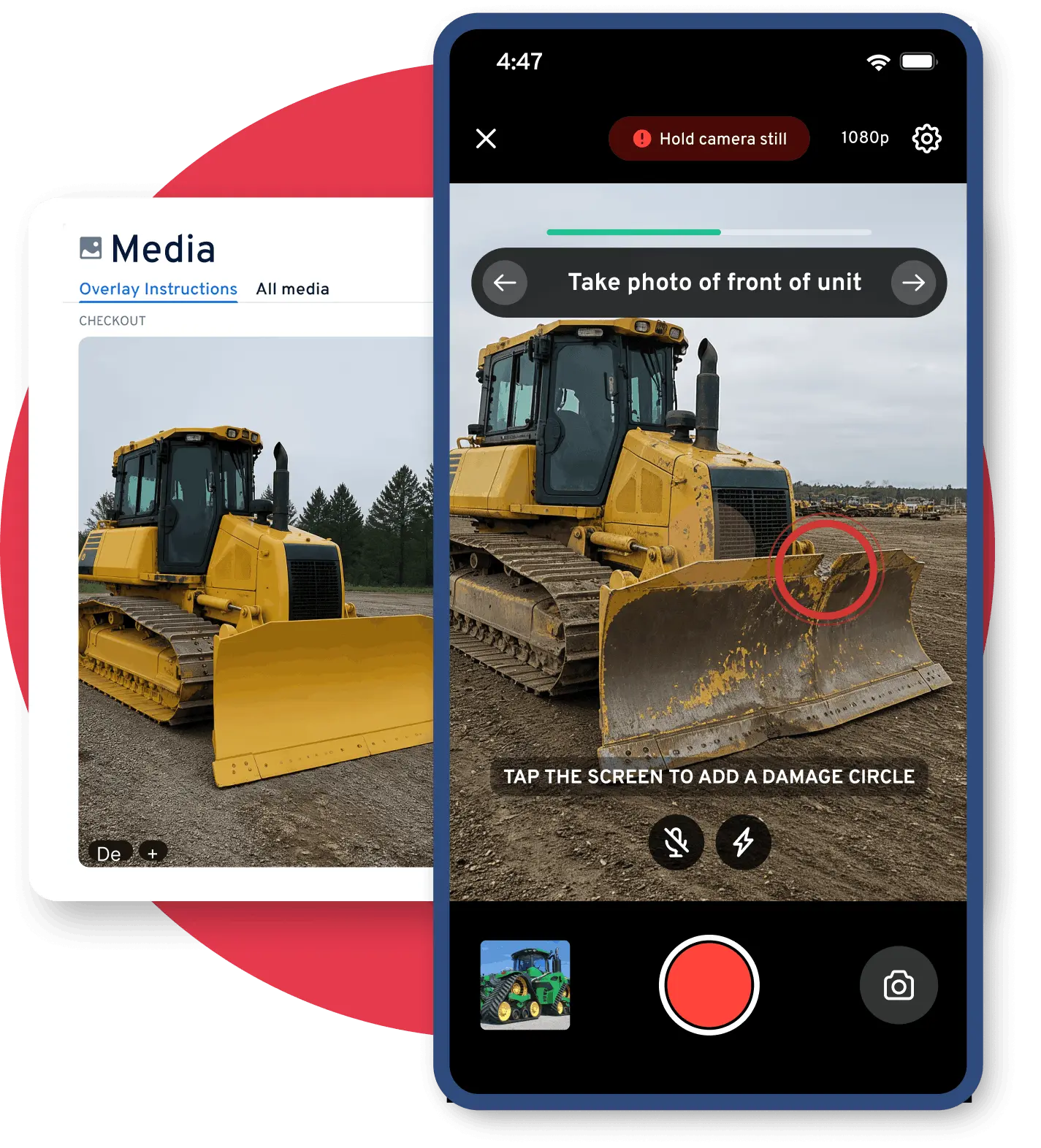
Record360 defensible asset condition documentation
Asset Lifecycle · Live Documentation
Checkout
✓ No damage 📍 Yard · 09:14 AM ✍️ Customer signed
Delivery
✓ Condition verified 📍 Site · 11:40 AM 📸 12 photos
Service
✓ Maintenance logged 📍 Workshop · Day 4 🔧 Work order attached
Return
⚠ New damage flagged 📍 Yard · 04:52 PM 🔴 Before/after matched
Four Capabilities

Four Capabilities That Create Defensible Digital Condition Reports

01

Standardized Condition Reports for Every Inspection

Inconsistent inspections result in incomplete documentation, making it difficult to prove asset condition later. Record360 standardizes inspections to generate a consistent digital condition report for every asset.
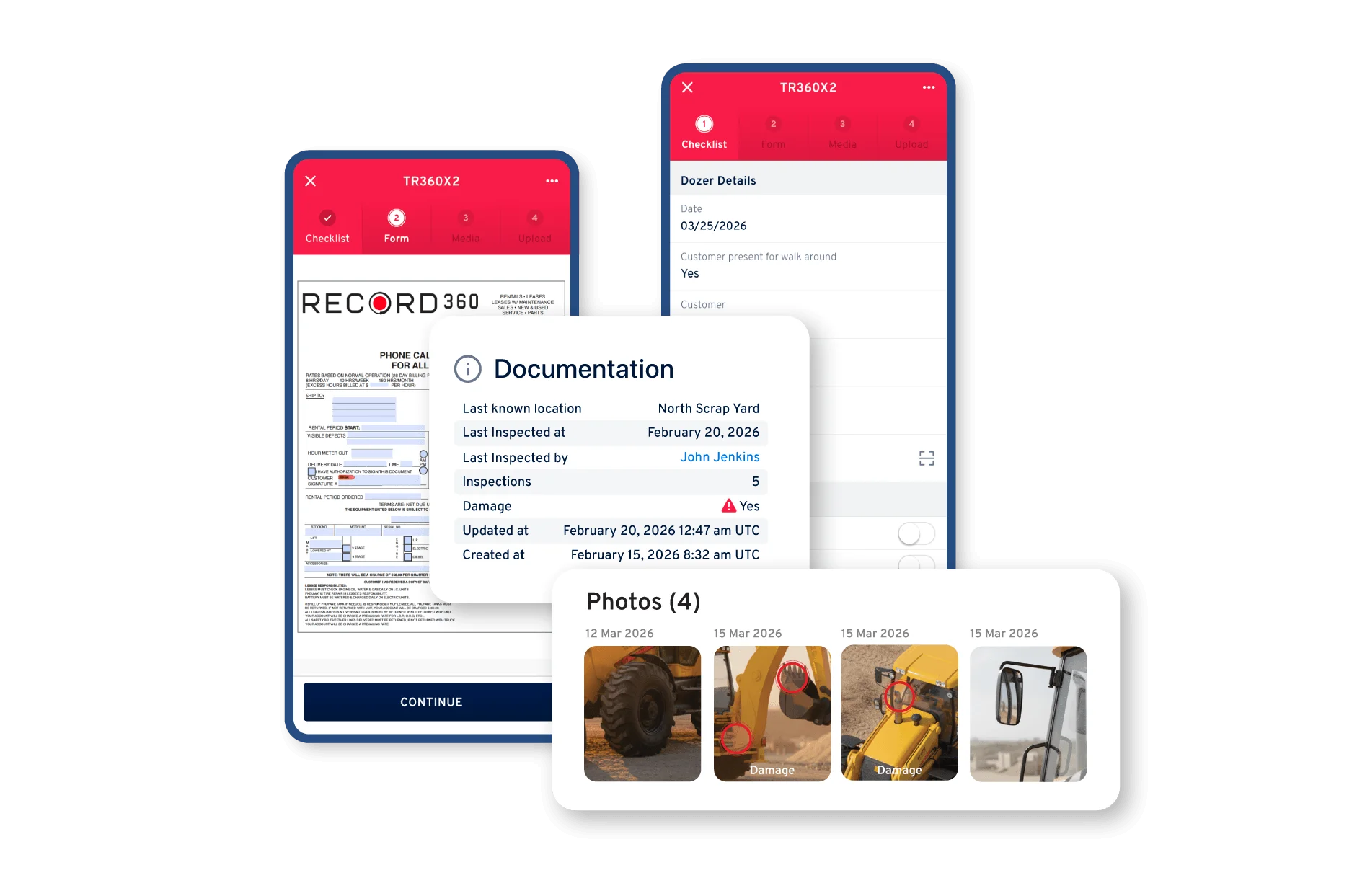
  • Photo and video documentation of asset condition
  • Guided inspection checklists for every asset type
  • Annotated damage photos
  • Inspection summaries and PDF reports
  • Mobile inspection reports completed in the field
Record360 standardized condition report screenshot
Record360 timestamped proof of condition screenshot
02

Timestamped Proof of Condition

Unlike basic phone photos, Record360 automatically adds timestamps, geotags, and inspection metadata to every image, creating a reliable inspection record. Each digital condition report shows:

  • Who performed the inspection
  • When the inspection occurred
  • Where the inspection took place
  • The exact condition of the asset at that moment
03

Before-and-After Documentation That Resolves Disputes

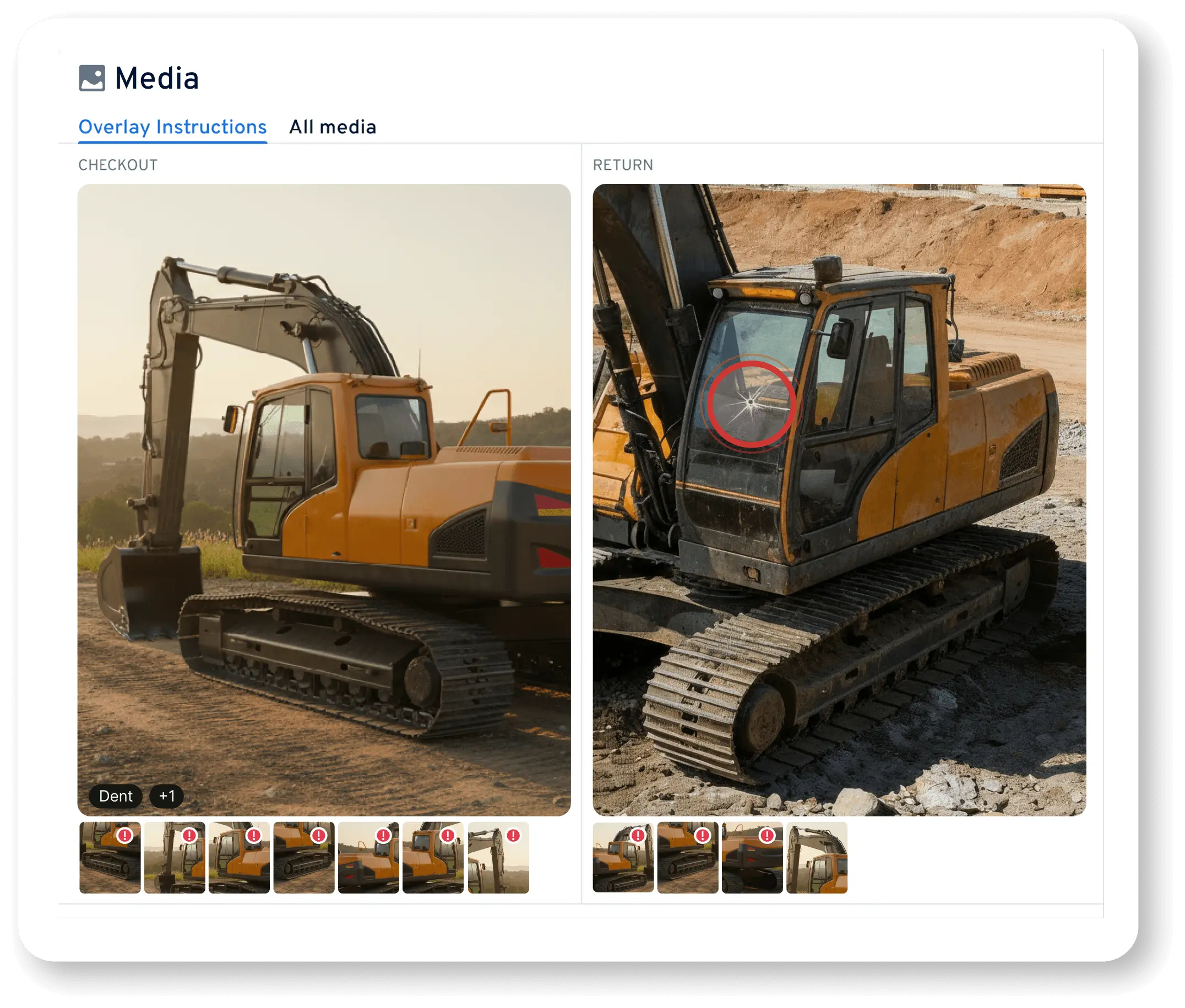
Record360 makes it easy to compare checkout and return digital condition reports side-by-side, helping teams identify new damage immediately.
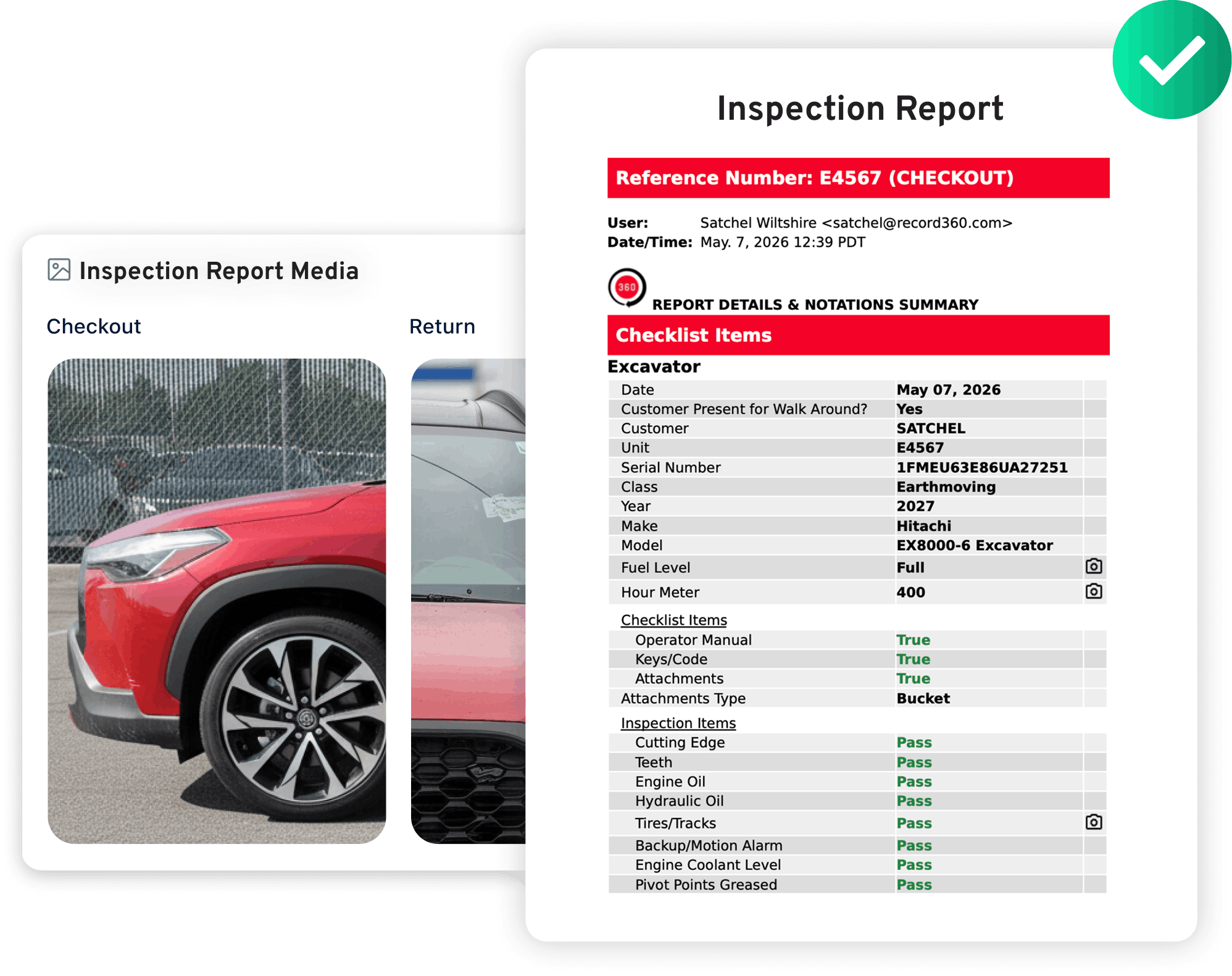
  • Identify new damage during return inspections
  • Document pre-existing damage clearly
  • Support damage claim documentation
  • Resolve disputes faster with visual proof
Record360 before and after documentation screenshot
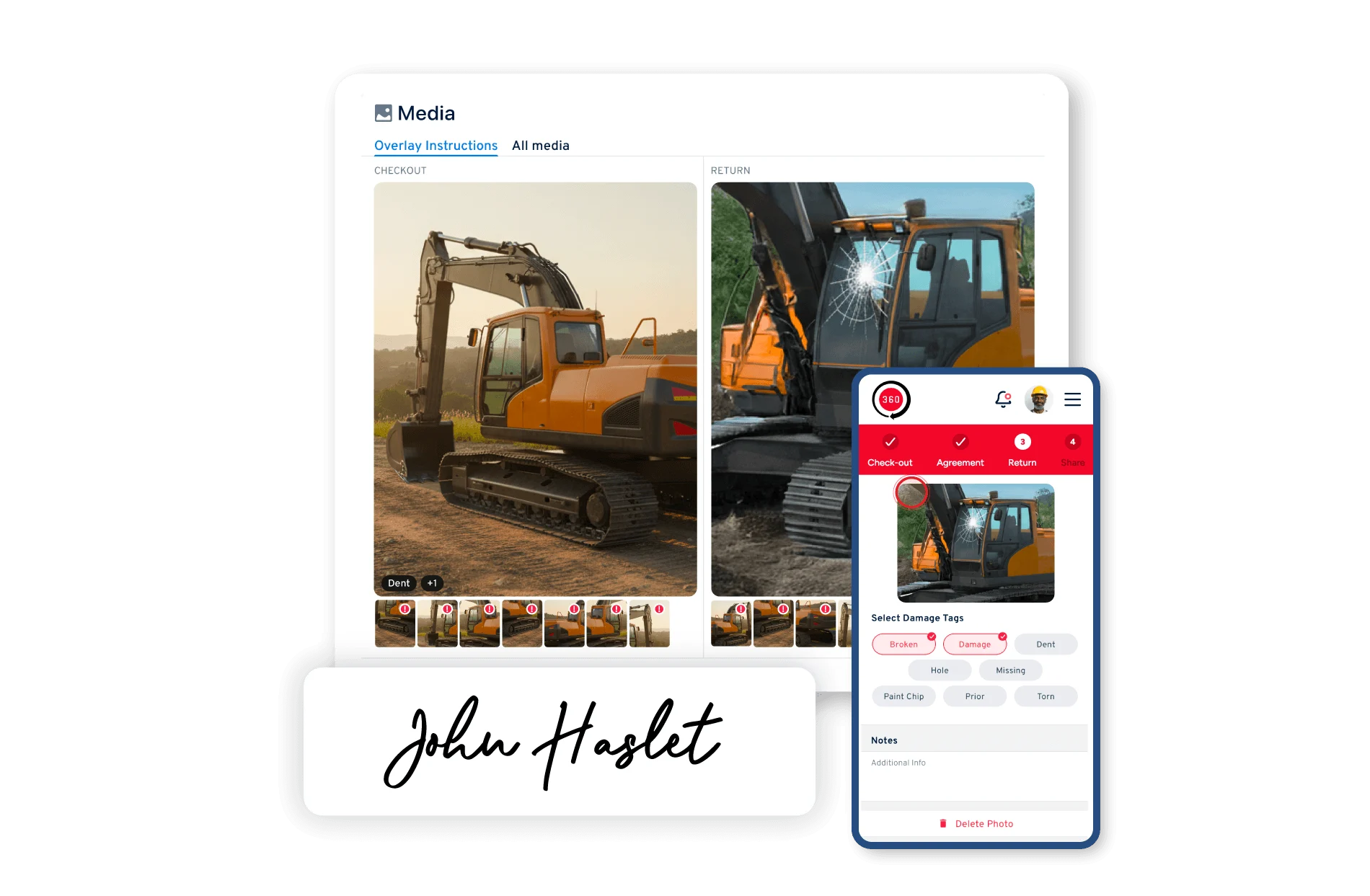
Record360 handoff proof of condition screenshot
04

Capture Proof of Condition at Every Handoff

Create point-of-handoff digital condition reports during checkout, delivery, and inspections so teams always have a trusted baseline.

  • Checkout and return inspection reports
  • Delivery and pickup condition reports
  • Driver vehicle inspection reports (DVIR)
  • Pre-trip and post-trip inspections
  • Customer-signed condition acknowledgments
From Inspection to Proof

From Inspection to Proof of Condition in Four Steps

Record360 works seamlessly with your existing workflow. No complicated setup, zero operational disruption.

1

Capture Inspection

Inspect assets using a mobile inspection checklist and capture photos, video, and notes.

2

Generate Report

Record360 automatically creates a digital condition report summarizing the inspection.

3

Customer Acknowledgment

Customers or drivers confirm asset condition with a signed digital condition report.

4

Retrieve Instant Proof

When disputes arise, retrieve the digital condition report or inspection report PDF instantly.

Before & After

What Changes When You Use Record360

The Problem Before Record360
No standardized documentation process
Inspection quality varies by person, location, and shift
Photos lack proof — no timestamps or geotags
Basic phone photos can't prove when or where damage occurred
No customer acknowledgment of asset condition
Nothing to prove the customer accepted the asset in its documented state
Records are buried, lost, or inaccessible
Paper forms and scattered files make retrieval slow and unreliable
No before-and-after comparison at handoff
Can't prove when damage happened without a trusted baseline
Blurry or missing photos go unnoticed
Incomplete documentation only surfaces when a dispute arises
Disputes drag on with no clear resolution
Without proof, damage claims become arguments that cost time and money
The Solution With Record360
Standardized digital condition reports
Consistent inspection format across every location and shift
Photo & video verified inspection documentation
Timestamped, geo-tagged photos and video tied to every inspection
Customer-signed digital condition reports
Legally binding e-signatures captured at point of handoff
Instant retrieval of condition report PDFs
Pull any record instantly — searchable, cloud-stored, always available
Before-and-after comparison at every handoff
Checkout, return, delivery, pickup — every event documented side-by-side
AI-powered blur detection & damage flagging
Automatically flags blurry photos and potential damage during inspections
Faster damage dispute resolution
Show the record — stop arguing, start recovering costs

Frequently Asked Questions

What is a condition report?

A condition report is a documented record of an asset’s condition at a specific point in time, typically captured during inspections, checkout, delivery, or maintenance events.

Record360 generates digital inspection reports using mobile checklists, photo documentation, timestamps, and signatures to create a defensible inspection record.

Yes. Inspection summaries can be shared instantly via email or SMS, and teams can generate inspection report PDFs for documentation.

Record360 supports equipment condition reports, vehicle condition reports, rental inspections, fleet inspections, and heavy equipment documentation.

No. Record360 supports offline use in yards, facilities, and field environments. Inspections and documentation can be completed without an active connection and will automatically sync once the device reconnects.


This ensures workflows continue uninterrupted regardless of location or connectivity.

Start Creating Defensible Condition Reports

Capture proof of asset condition at checkout, delivery, inspections, and returns—so your team always has the documentation needed to resolve disputes.